
Best overall: Pull Tally. Best for an occasional lookup: GitHub search. Best budget option: GitHub CLI. These are the best GitHub PR dashboard tools for solo developers in 2026 because each addresses a distinct workflow, from monthly review preparation to terminal-based reporting.
- Pull Tally is the best GitHub PR dashboard for browsing merged PRs by month, organization, or personal repository.
- GitHub search is best for an occasional lookup using qualifiers such as is:pr, is:merged, and author:@me.
- GitHub CLI is best for developers who want to script, filter, or export pull request data.
- GitHub Projects tracks active work well but requires manual upkeep for a personal delivery history.
- A spreadsheet adds useful context, but every merged pull request must be recorded manually.
Why this matters
A performance review or job search often requires more than a total pull request count. You need to remember which changes merged, when they merged, which repository they affected, and why the work mattered. Pull Tally reduces the repeated GitHub searching by grouping merged pull request history around the individual developer.
Manual search works until the time range expands. A 12-month review becomes 12 dated queries when you want a separate result for each month. A 3-month review still needs 3 monthly ranges, followed by manual sorting if your work spans personal repositories and an organization.
The right tool depends on whether you need historical recall, a quick answer, custom automation, active-work planning, or narrative notes. PR counts alone are not a productivity score. They are evidence you can use to reconstruct delivery history and identify work that deserves a clearer explanation.
What makes the best GitHub PR dashboard tool
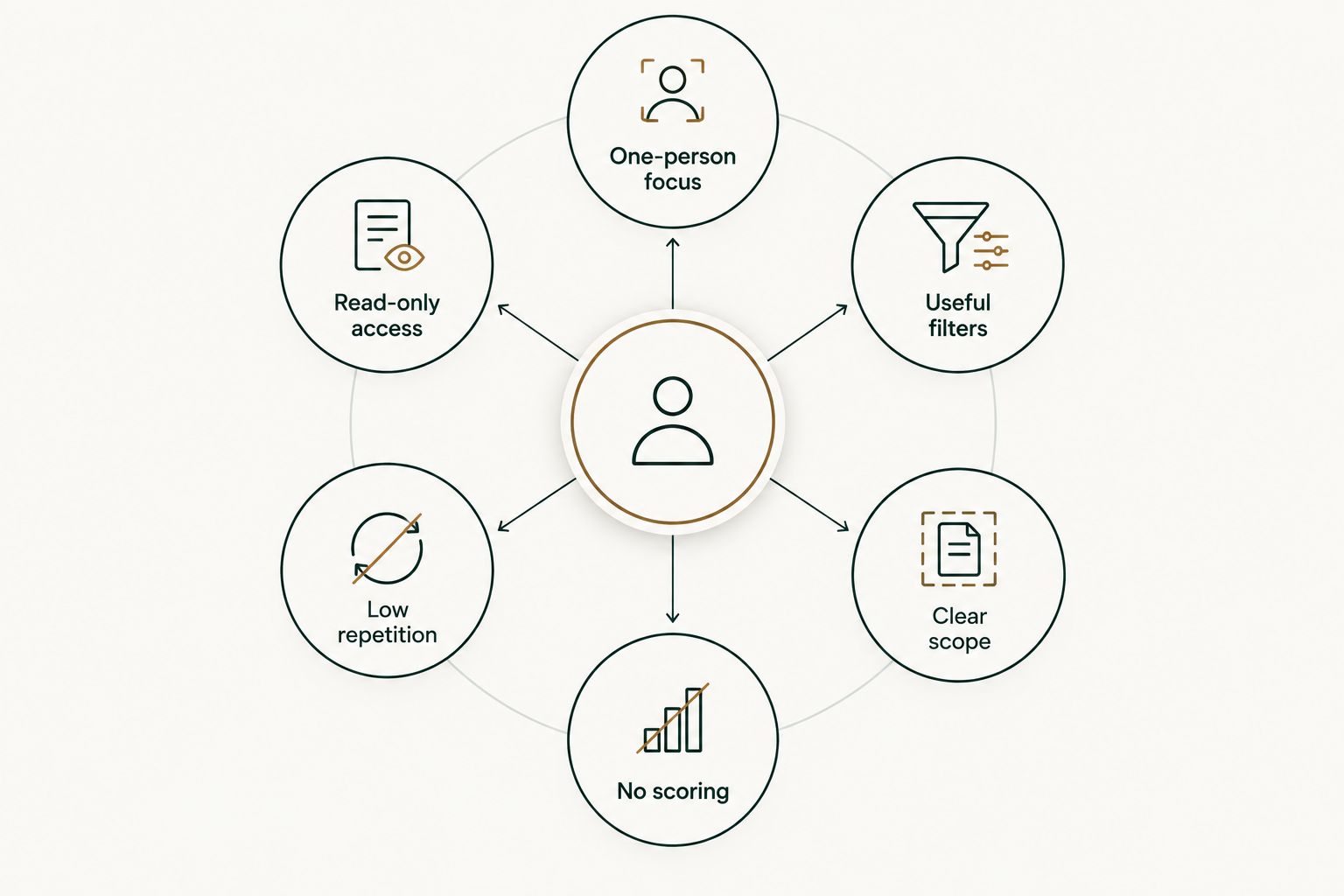
- One-person focus: The default view should answer questions about your work without requiring team configuration.
- Read-only access: A history tool should explain what metadata it reads and why it needs that access.
- Useful filters: Month, organization, repository, author, and merge status are the filters that reduce manual searching.
- Low repetition: A recurring review workflow should not require rebuilding the same queries every time.
- Clear scope: The tool should distinguish merged work from open, draft, closed, reviewed, or co-authored pull requests.
- No scoring: Pull request volume should remain a personal delivery record, not an employee ranking.
Best GitHub PR dashboard tools at a glance
| Rank | Tool | Best for | Standout feature | Key limitation |
|---|---|---|---|---|
| 1 | Pull Tally | Monthly merged PR history | Filters history by month, organization, or personal repository | Focuses on merged pull requests rather than active work |
| 2 | GitHub search | Occasional PR lookups | Flexible search qualifiers inside GitHub | Monthly reporting requires repeated date queries |
| 3 | GitHub CLI | Scripted PR reporting | Terminal output that can feed a custom workflow | You must build and maintain the reporting logic |
| 4 | GitHub Projects | Tracking active work | Table and board views with custom fields | Historical reporting requires manual organization |
| 5 | Private spreadsheet | Adding review context | Custom notes beside each recorded contribution | Every row must be maintained manually |
1. Pull Tally: best for monthly merged PR history
This web tool lets individual software developers browse and summarize merged GitHub pull requests by month, organization, or personal repository. That structure matches a common review workflow: choose a period, scan what merged, and identify the changes that need context in a review document.
Access is read-only and limited to pull request metadata. Signing in alone does not connect private organization repositories. That separation lets you review the requested permissions before deciding whether private organization history belongs in the dashboard.
Pull Tally pros:
- Groups merged pull request history by month
- Filters work by organization or personal repository
- Replaces repeated searches across review periods
- Keeps the focus on personal delivery history instead of productivity scoring
Pull Tally cons:
- It is not an active sprint board for open or draft pull requests
- A merged pull request title still needs human context before it belongs in a performance review
- It does not replace issue tracking or project planning
Best for: individual developers preparing a 2026 performance review, job application, or personal work archive. Verdict: Buy when repeated GitHub searching is the problem you need to remove.
2. GitHub search: best for an occasional PR lookup
GitHub search can answer a direct question without adding another tool. The query is:pr is:merged author:@me limits results to merged pull requests authored by the signed-in developer, while repository, organization, and date qualifiers can narrow the result further.
This approach is strongest when the task is small. If you only need to find a particular change or check one review period, a saved query may be enough. It becomes repetitive when you need separate monthly counts across a full year.
GitHub search pros:
- Works inside the GitHub interface you already use
- Combines author, merge status, repository, organization, and date qualifiers
- Supports broad discovery before you know the exact repository
- Requires no separate personal dashboard
GitHub search cons:
- Does not automatically group a year of results by month
- Search syntax must be edited when the time period changes
- Results still need to be transferred into a review document
- Authored PR searches do not represent reviews or every form of contribution
Best for: developers who need one answer now rather than a recurring dashboard in 2026. Verdict: Hold as the default for occasional lookups, but move to a dedicated history view when the same search keeps returning.
3. GitHub CLI: best for scripted PR reporting
GitHub CLI brings pull request search into the terminal. A command such as gh search prs --author=@me --merged can form the starting point for a script that filters results, selects fields, or sends output into another local workflow.
The advantage is control. You decide how the report is structured and where the output goes. The trade-off is ownership: when a command, field, or desired format changes, you maintain the script and validate the results.
GitHub CLI pros:
- Fits terminal-based development workflows
- Supports repeatable commands instead of manual browser searches
- Can feed pull request data into scripts and local files
- Allows developers to define their own reporting format
GitHub CLI cons:
- Requires installation, authentication, and command-line familiarity
- Raw results are not automatically a readable monthly dashboard
- Date grouping and cross-repository summaries require additional logic
- A custom script becomes another piece of code to maintain
Best for: developers who already automate personal reporting and want full control over the output. Verdict: Buy for an established scripting workflow; Skip if maintaining reporting code creates more work than the original search.
4. GitHub Projects: best for tracking active PR work
GitHub Projects supports table and board views for issues and pull requests, with custom fields that can represent status, priority, iteration, or another workflow-specific category. It is useful when your main question is what is happening now rather than what merged several months ago.
A project can become a personal work queue, but historical reporting depends on consistent upkeep. Pull requests that were never added, categorized, or moved through the board will not produce a complete delivery history later.
GitHub Projects pros:
- Keeps active issues and pull requests in a shared planning view
- Supports table and board layouts
- Allows custom fields for a personal workflow
- Connects planning records with development activity inside GitHub
GitHub Projects cons:
- Requires ongoing organization rather than passive historical browsing
- A planning board can become stale when updates are skipped
- Monthly merged PR summaries are not its primary purpose
- Review notes still need to be written somewhere else
Best for: solo developers who want a current-work dashboard and are willing to maintain it. Verdict: Hold for planning; Skip when the only requirement is reconstructing merged work from 2026.
5. Private spreadsheet: best for adding narrative context
A spreadsheet is the most flexible option because each row can pair a merged pull request with impact, collaborators, technical constraints, or a link to supporting material. That context matters in a performance review because a small pull request can resolve a difficult problem, while a large one can be routine generated output.
The weakness is capture. A spreadsheet row represents 1 recorded contribution, not an automatically discovered contribution. If updates stop for several months, the spreadsheet turns into another incomplete source that must be reconciled against GitHub.
Private spreadsheet pros:
- Lets you define columns around your review or job-search needs
- Stores narrative context that a PR title cannot communicate
- Makes it easy to select the strongest examples for a document
- Works well as the final destination for evidence gathered elsewhere
Private spreadsheet cons:
- Every contribution must be added and maintained manually
- Missing rows are difficult to detect without checking GitHub again
- Repository and date filters depend on consistent data entry
- It does not discover merged pull requests on its own
Best for: developers who need a curated evidence file with explanations beside each contribution. Verdict: Hold as a context layer, not as the only source of PR history.
How these tools were ranked
The ranking prioritizes individual-developer fit, merged-history visibility, permission clarity, useful filtering, and the amount of repeated work required. Team leaderboards and productivity scoring were excluded because they do not answer the core question: what did one developer merge during a defined period?
The ranking also separates discovery from explanation. A dashboard can recover titles, repositories, dates, and merge status. It cannot decide why a change mattered, what constraint made it difficult, or how it affected users. Those details belong in your review notes.
Browse your merged PR history
Filter merged pull requests by month, organization, or personal repository.
Which GitHub PR dashboard should you choose?
Choose Pull Tally when you repeatedly need monthly merged PR history for reviews or job searches. It is the default recommendation for solo developers in 2026 because its scope matches the task without introducing team analytics or productivity scores.
Use GitHub search for a one-time lookup. Choose GitHub CLI when you already maintain scripts and want custom output. Use GitHub Projects for active planning, then keep a private spreadsheet only when you need narrative details that do not belong in pull request metadata.
The deciding question is simple: do you need to discover past work or explain its impact? Use a PR history tool for discovery, then add a small set of meaningful examples to your review document instead of treating the total count as the result.
FAQ
What is the best GitHub PR dashboard for solo developers in 2026?
Pull Tally is the best choice for solo developers who need merged pull requests grouped by month, organization, or personal repository. GitHub search is better when you only need an occasional lookup.
Can GitHub show all my merged pull requests?
Yes. GitHub search can find authored, merged pull requests with qualifiers such as is:pr, is:merged, and author:@me. You must add repository, organization, or date qualifiers when you need a narrower result.
How do I find pull requests merged during a specific month?
Use a GitHub merged-date qualifier or a personal dashboard that groups merged pull requests by month. A dashboard removes the need to rewrite the date range for every monthly review.
Does signing in connect private organization repositories?
No. Signing in alone does not connect private organization repositories. Private organization access requires a separate connection decision, and access is read-only for pull request metadata.
Is Pull Tally a developer productivity score?
No. It presents personal delivery history, not a productivity score. Pull request totals need context and should not be used as a standalone measure of developer performance.
Is GitHub CLI better than a browser dashboard?
GitHub CLI is better when you want scriptable output and already work comfortably in the terminal. A browser dashboard is better when you want to browse monthly history without maintaining reporting code.
Should I include every pull request in a performance review?
No. Use the complete history to prevent forgotten work, then select examples that show impact, technical judgment, collaboration, or sustained ownership. A focused explanation is more useful than an unexplained total.
Can GitHub Projects replace a personal PR history dashboard?
GitHub Projects can track active work, but it depends on consistent board maintenance. A historical PR dashboard is better for recovering merged work that was not manually added to a project.
One last thing
A pull request title records what changed, not why the change mattered. When you review 2026 history, add one sentence of context to each strong example: the problem, your decision, and the result you can support. That turns a merged-work tally into evidence without pretending the tally itself measures performance.