
Best overall for reviewing merged GitHub pull requests: Pull Tally. Best for a one-off PR lookup: GitHub search. Best for local commit history: git log. Best for a repeatable PR report: GitHub CLI. The best tools for solo founders to track commits and PRs in 2026 depend on whether you need a monthly record, a specific change, or a list you can process yourself.
- Pull Tally is the best fit for browsing merged GitHub pull requests by month, organization, or personal repository.
- For the best tools for solo founders to track commits and PRs, choose git log when commits are the source of truth.
- Use GitHub search for an occasional merged PR lookup; use GitHub CLI when you want to shape the output yourself.
- A PR history records delivered changes, not a productivity score.
Why this matters
A solo founder can ship through several repositories and still struggle to answer a simple question: what changed over the past few months? Your commit history and merged PR history answer different parts of that question. A commit records a change in Git history. A merged PR gives you a reviewable unit with a title, discussion, and merge event on GitHub.
That distinction matters when you prepare an investor update, write a job application, or reconstruct the work behind a product decision. A count alone cannot explain why a change mattered. Start with the record that matches your workflow, then add the context yourself. In 2026, the right tool is the one that removes the search you would otherwise repeat without turning your activity into a score.
What makes the best commit and PR tracking tool?
Use these criteria before choosing from the table. The first question is not which tool has the most features; it is which record you actually need.
- Record type: Do you need Git commits, GitHub PRs, or both? A PR browser does not replace a commit log, and a commit log does not show the full PR discussion.
- Time view: Can you inspect a month of work without repeating the same search for every repository? This matters more for a review than for a single lookup.
- Repository scope: Can you separate a personal repository from organization work? Check the scope before you combine unrelated projects in one summary.
- Effort to repeat: A manual search is reasonable once. A recurring report calls for saved commands or a purpose-built history view.
- Access and trust: Understand what data a tool reads and which repositories you have connected. Do not infer that a sign-in grants access to private organization work.
- Evidence quality: Prefer records you can revisit. A tally helps you locate work; titles and underlying changes help you explain it.
The options at a glance
| Tool | Best for | Standout feature | Key limitation |
|---|---|---|---|
| Pull Tally | Monthly merged-PR history | Browse by month, organization, or personal repository | Does not track commits |
| GitHub search | One-off merged-PR lookup | Search GitHub PRs with filters | Repeating searches takes manual work |
| git log | Local commit inspection | Shows Git commit history directly | Does not provide a PR history |
| GitHub CLI | Repeatable PR queries | Returns PR fields for command-line processing | Requires a command-line workflow |
1. Pull Tally: best for monthly merged-PR history
Pull Tally is a web tool for individual developers to browse and summarize their merged GitHub pull requests by month, organization, or personal repository. It fits a founder who needs to reconstruct what reached the product across several months, then pick the changes that belong in a review or update. You can browse and export monthly history rather than rerunning a separate GitHub search for each month.
Pull Tally pros:
- Groups merged PR history by month, which matches how many people prepare updates.
- Lets you distinguish organization work from a personal repository.
- Provides a starting record for a written summary without treating PR totals as a performance measure.
Pull Tally cons:
- It tracks merged PRs, not individual commits. Use Git history when the commit itself is the record you need.
- An unmerged PR will not belong in a merged-PR tally. Record unfinished work separately if it matters to your update.
Access: Pull Tally uses read-only access to pull request metadata. Signing in alone does not connect private organization repositories. If a private repository is absent from the view, check its connection and permissions rather than assuming the work did not happen.
Best for: A founder who merges work through GitHub PRs and needs to browse monthly delivery history. Verdict: Buy when manual GitHub searching has become a recurring part of your review preparation; skip it for commit-only work. Pull Tally is best for merged-PR history, not for measuring developer productivity.
2. GitHub search: best for a one-off merged-PR lookup
GitHub search is the direct choice when you remember a repository, a month, or part of a PR title and need to find the underlying record. You can filter a PR search by author and merge date. For example, is:pr is:merged author:@me merged:2026-01-01..2026-01-31 is a starting query for PRs you authored and that merged during January 2026; check the results and repository scope before using them in a summary.
GitHub search pros:
- Takes you to the original PR, where you can read its title and surrounding context.
- Works well when the question is narrow: find a change, verify a merge, or recover a link.
- Requires no separate monthly reporting workflow for an occasional lookup.
GitHub search cons:
- You must adjust and repeat queries to cover different months or scopes.
- Search results are not a written account of what the changes achieved. You still have to select and explain the relevant PRs.
Best for: A founder who needs to verify one change or answer an occasional question about merged work. Verdict: Buy for a quick lookup; hold if the same monthly search keeps returning to your task list. In 2026, a direct GitHub search remains the shortest route when you need the PR itself rather than a report about it.
3. git log: best for local commit inspection
git log reads commit history in a Git repository. Use it when you want to inspect a sequence of commits, check authorship recorded in Git, or trace a change that never went through a GitHub PR. A command such as git log --author='Your Name' --since='2026-01-01' --until='2026-01-31' --oneline narrows one repository's history to an author and date range; replace the name with the author information used in that repository.
git log pros:
- Works from the repository's Git history rather than a PR list.
- Shows commits even when a project does not use pull requests.
- Lets you narrow the view by author and date when you need to inspect a period of work.
git log cons:
- Commit authorship is not a complete account of collaboration or impact.
- A local repository view does not automatically combine work from every repository you used, and commit history does not supply PR discussion.
Best for: A founder whose question is about commits, especially work committed without PRs. Verdict: Buy for commit inspection; skip it as a substitute for a merged-PR history. If your update needs both records, inspect the commits for technical detail and link the relevant merged PR for the broader change.
4. GitHub CLI: best for repeatable PR queries
GitHub CLI suits a developer who wants PR data in a terminal and is willing to define the query and output. The gh pr list command can list merged PRs for a repository and request fields such as title, merge date, and URL. For example, gh pr list --state merged --author @me --json title,mergedAt,url gives you fields you can inspect or process in your own command-line workflow.
GitHub CLI pros:
- Gives you explicit fields rather than requiring you to copy details from search results.
- Fits a workflow you already run in the terminal.
- Keeps the original PR URL alongside its title and merge date when you request those fields.
GitHub CLI cons:
- You must set the repository scope and check that the returned list covers the work you intend to summarize.
- The output does not write a useful review narrative for you; you still choose and explain the changes.
Best for: A founder who is comfortable maintaining a repeatable terminal query for GitHub PRs. Verdict: Buy if you want to process PR fields yourself; hold if your real need is simply to browse a month and remember what shipped. For a 2026 review, verify the query's scope before treating its output as a complete record.
Turn the records into a useful summary
The tools find evidence. Your summary supplies the meaning. Keep the process small enough that you will repeat it at the end of a month, not only when a review deadline arrives.
Set the question
Decide whether you are documenting merged delivery, inspecting commits, or locating one change. If the question is what shipped in March 2026, start with merged PRs when your workflow uses PRs. If the work went straight into Git history, start with commits. Do not add the two counts together and call the result output: one PR can contain several commits.
Check the scope
Name the repositories and accounts the summary should cover. Separate personal projects from organization work when those tell different stories. If a private organization repository is not visible in Pull Tally, remember that signing in alone does not connect it. An incomplete view is a reason to check access, not a reason to erase the work from your notes.
Record evidence
Keep the link or commit identifier for each change you might describe. A title such as a feature name helps you find the record, but it does not establish the outcome. Reopen the PR or inspect the commit when you need to confirm what changed. Set aside routine changes that do not support the point you are trying to make rather than listing everything that merged.
Write the summary
For each selected change, state the problem, your contribution, and the result you can substantiate. If you cannot verify a result, describe the delivered change without attaching a claim about its effect. For a performance review or job search, this gives the reader a small set of traceable examples instead of a larger activity tally.
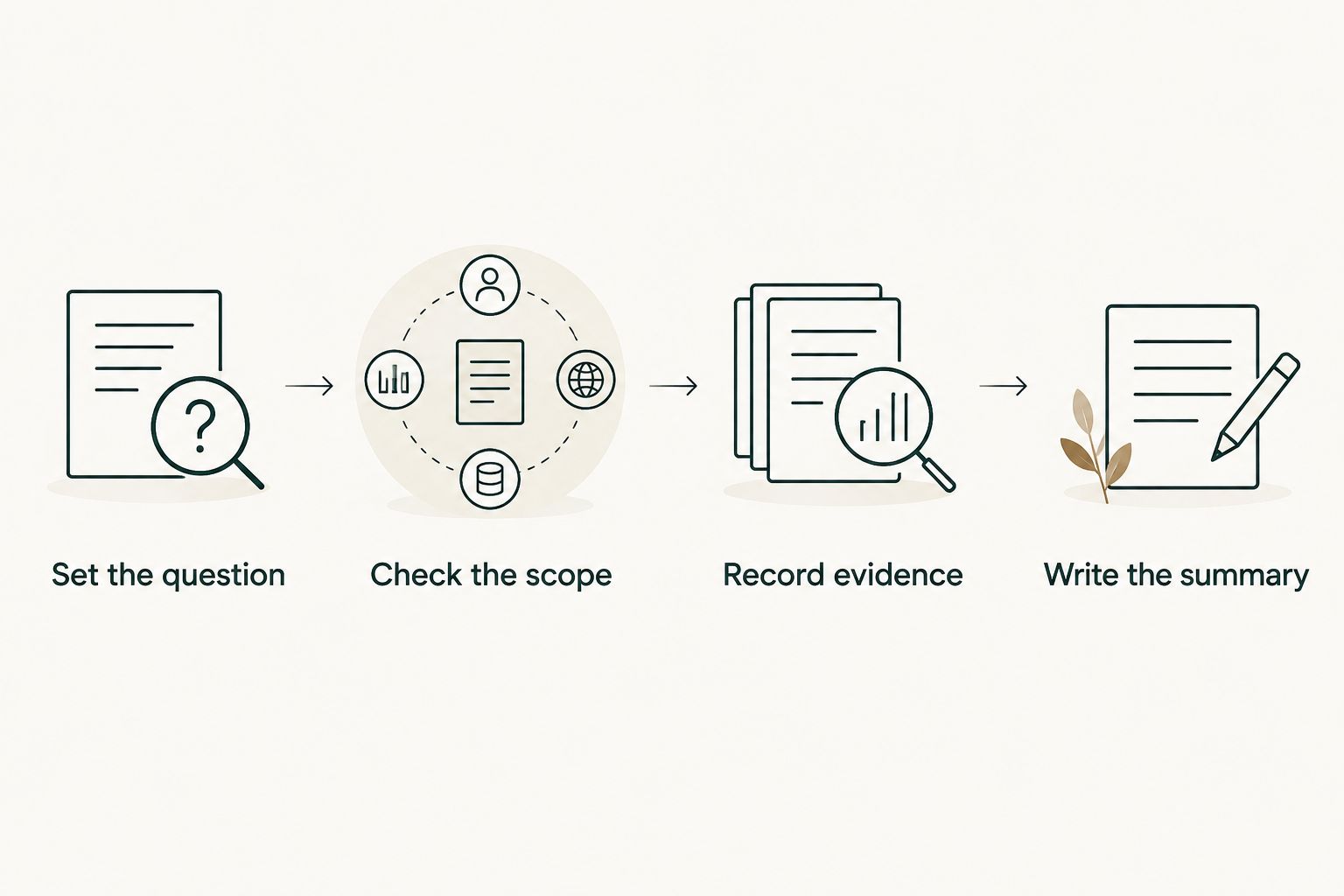
This process also gives you a stopping point. Once you have the records that support the update, stop collecting counts and write. If your work spans several repositories, check each relevant scope before deciding that a quiet month in one repository was a quiet month overall.
How these tools were ranked
The order prioritizes a solo founder's recurring need to review merged GitHub work by month. Pull Tally comes first for that job because its view is organized around merged PR history and repository scope. GitHub search wins when the task is a single lookup; git log wins when the source record is a commit; GitHub CLI wins when you want PR fields for a terminal workflow.
That is a task ranking, not a claim that one tool replaces the other three. None of these options can infer the business importance of a change from its count. If your workflow rarely uses PRs, move git log to the top of your own list. If you already have a repeatable command that answers your question, keep it.
Which tool should you choose?
Choose Pull Tally if you regularly need a month-by-month view of merged GitHub PRs. It replaces repeated browsing when you are assembling a delivery history, while the linked PRs remain the evidence to inspect. Choose GitHub search when you need one PR now. Choose git log when commits, not PRs, are the record. Choose GitHub CLI when you want to control a repeatable PR query in the terminal.
For a founder preparing a 2026 review, the default is a monthly PR view only if merged PRs reflect how the work reached the repository. Otherwise, start with Git history. The useful output is a short, checked account of changes you can explain, not a higher tally.
FAQ
What's the best tool for a solo founder to review merged GitHub PRs?
Pull Tally is the best fit when you need to browse merged GitHub PRs by month, organization, or personal repository. Use GitHub search instead when you only need to locate one PR.
Does Pull Tally track commits as well as pull requests?
No. Pull Tally is for browsing and summarizing merged GitHub pull requests. Use git log when you need commit history.
Is GitHub search better than Pull Tally for one PR?
Yes. GitHub search is the direct choice for an occasional lookup of a specific PR. Pull Tally fits repeated monthly review of merged PRs.
What data does Pull Tally access?
Pull Tally uses read-only access to pull request metadata. Its purpose is to browse and summarize merged GitHub PR history, not to assign a productivity score.
Does signing in connect my private organization repositories?
No. Signing in alone does not connect private organization repositories to Pull Tally. Check the connection and permissions before treating a missing repository as missing work.
Can a commit count replace a PR history?
No. Commits and merged PRs are different records, and one PR can contain several commits. Choose the record that matches the question you need to answer.
What should I include in a 2026 performance review?
Include selected changes you can explain and verify, with links to the relevant PRs or commit identifiers. Describe your contribution and only claim outcomes you can substantiate.
One last thing
A missing repository can distort a monthly story more than a missing metric. Before writing that you shipped less in a particular month, check whether you searched the right repository, account, and record type. Pull Tally's read-only PR metadata view is useful for browsing merged work, but signing in alone does not connect private organization repositories. Confirm the scope first; interpret the tally second.