
Best overall for monthly merged-PR history: Pull Tally. Best for a targeted lookup: GitHub search. Best for public portfolio context: your GitHub profile. Best for a repeatable command-line workflow: GitHub CLI. This 2026 guide compares the best github activity tracking apps for job seekers by the evidence each helps you retrieve, not by activity scores.
- Pull Tally leads the best github activity tracking apps for job seekers shortlist for monthly merged pull request history.
- GitHub search suits occasional lookups scoped to an author, repository, organization, or merge date.
- Your GitHub profile provides public portfolio context, not a complete account of your work.
- GitHub CLI suits developers who want to retrieve pull request metadata through repeatable commands.
- Use merged PRs to find interview examples; explain your contribution and outcome separately.
Why this matters
Preparing for interviews often starts with a memory problem. You remember fixing an awkward migration or improving an error path, but not the repository, merge date, or pull request title. An activity record helps you find the original work.
It does not write your résumé for you. A merged pull request shows that a change was integrated; it does not establish the business outcome, your exact role, or the difficulty of the work.
Pull Tally is the best fit for individual developers who need to browse monthly merged pull request history rather than repeat manual GitHub searches. Use that history as a starting point for a private evidence document, then choose examples you can explain and are permitted to share.
What makes the best GitHub activity tracking app?
The useful question is not which app displays the most activity. It is which app helps you recover evidence for the job application or interview in front of you.
- Merged-work retrieval: Find integrated pull requests without confusing them with open or closed-but-unmerged work.
- Scope control: Separate organization work, personal repositories, and the period relevant to your application.
- Original context: Keep enough information to return to the underlying pull request and inspect what changed.
- Permission clarity: Understand what the tool reads and whether private organization repositories are connected.
- Workflow fit: Choose between an occasional lookup, a recurring monthly review, a public presentation, and a scripted collection.
- Interpretation limits: Treat counts as an index of work, not a measurement of developer quality.
For a 2026 job search, define your review period before collecting anything. A 1-month review helps you recall recent work; a 3-month review groups related changes; a 12-month review gives you a longer set of examples to inspect. These are planning windows, not performance benchmarks.
GitHub activity tracking options at a glance
| Option | Best for | Standout function | Key limitation |
|---|---|---|---|
| Pull Tally | Recurring monthly merged-PR review | Browse and summarize merged PRs by month, organization, or personal repository | Merged PR history is narrower than your complete contribution history |
| GitHub search | A specific evidence lookup | Filter pull requests by author, scope, and merge date | Repeated searches require manual query management |
| GitHub profile | Public portfolio presentation | Present repositories and contribution context in one public-facing place | Public visibility does not establish the full scope or impact of your work |
| GitHub CLI | Repeatable command-line collection | Retrieve pull request fields through commands and structured output | Requires authentication, query setup, and output handling |
The table separates collection from presentation. Monthly history and search help you find examples. A profile helps someone else inspect public work. Command-line collection suits you when maintaining a repeatable query is easier than repeating a browser workflow.
1. Pull Tally: best for monthly merged-PR review
Pull Tally is a web tool for individual software developers to browse and summarize merged GitHub pull requests by month, organization, or personal repository. It fits the recurring task of reconstructing what you shipped before updating a résumé, preparing a performance review, or choosing interview stories.
Start with the month or organization relevant to your question. Browse the merged work, then select changes that show a decision you made, a problem you solved, or a responsibility you owned. The tally tells you where to look; your explanation supplies the meaning.
A useful job-search workflow
Suppose you are preparing for a backend interview and remember several related changes spread across repositories. Reviewing merged history by organization gives you a starting scope; reviewing by month helps you recover the sequence. You can then distinguish the implementation work from follow-up fixes instead of describing every pull request as a separate achievement.
Pull Tally pros:
- Browses merged work rather than requiring you to reconstruct it from memory.
- Supports monthly review when you revisit delivery history regularly.
- Separates organization and personal repository history for different application contexts.
- Uses read-only access to pull request metadata.
Pull Tally cons:
- Merged PR history does not cover every contribution, such as planning, mentoring, or unmerged work.
- A summary cannot establish impact or replace reading the underlying change.
- Signing in alone does not connect private organization repositories; do not assume that history is included.
Best for: Individual developers who repeatedly gather monthly merged-PR evidence.
Verdict: Buy into this workflow when it replaces repetitive manual GitHub searching; skip it for a single lookup.
2. GitHub search: best for finding a specific merged change
GitHub search is the direct option when you know roughly what you need. Pull request qualifiers let you narrow results by author, repository, organization, and merge date without introducing another activity-tracking tool.
This works well when an interviewer asks about a particular project, or when you need to recover a change from a known repository. Keep the query narrow enough that you can inspect the results rather than treating the result count as your answer.
Search for merged work, not merely closed work
A useful starting query is is:pr is:merged author:YOUR_USERNAME merged:2026-01-01..2026-01-31. Replace YOUR_USERNAME with your GitHub username. Add org:YOUR_ORGANIZATION or repo:OWNER/REPOSITORY when you need a narrower scope; those uppercase values are query variables, not literal organization names.
The distinction matters: is:closed includes pull requests closed without merging. For delivery-history review, use is:merged and a merge-date filter. Then open relevant results and check the title, description, discussion, and actual changes.
GitHub search pros:
- Works directly where the pull requests already live.
- Supports targeted searches without a separate reporting workflow.
- Makes it straightforward to inspect the original discussion and change.
- Lets you adjust scope when the first query is too broad.
GitHub search cons:
- Repeating the same monthly review means maintaining and rerunning queries yourself.
- Search results still need selection and interpretation before becoming interview evidence.
- Results depend on the repositories your account can access.
Best for: Developers recovering a specific change or doing an occasional review.
Verdict: Buy into GitHub search for a focused lookup; skip manual repetition when monthly review becomes routine.
3. GitHub profile: best for public portfolio context
Your GitHub profile is a presentation surface, not a private delivery report. It combines public-facing repository context with contribution information so a reviewer can explore work you choose to make visible.
Use it when an application invites a GitHub link and you have relevant public work to show. Give the reviewer a clear route to the repositories that support your application rather than expecting the contribution graph to explain your experience.
Help the reviewer understand the work
Pinned repositories can direct attention to projects you want someone to inspect. A profile README can explain your focus and give context for those projects. Neither replaces repository documentation that describes what a project does and how someone can evaluate it.
For your 2026 applications, inspect your profile from the perspective of someone without access to your employer's repositories. Do the visible projects support your claims? Do they contain enough explanation to understand your role? Private work needs an approved description, not an assumption that a recruiter can see it.
GitHub profile pros:
- Gives an application reader a public destination for inspecting your work.
- Lets you emphasize selected repositories through pinned projects.
- Supports written context through a profile README.
GitHub profile cons:
- A contribution graph does not explain the difficulty, ownership, or outcome of a change.
- Publicly visible work is not a complete record of private organization work.
- Reviewers still need project documentation to understand what they are seeing.
Best for: Developers presenting relevant public repositories to hiring teams.
Verdict: Buy into a clear public profile as supporting context; skip contribution counts as evidence of job readiness.
4. GitHub CLI: best for repeatable command-line collection
GitHub CLI lets you work with GitHub from your terminal, including listing pull requests and retrieving structured fields. It suits developers who want to maintain a repeatable collection process and handle the output themselves.
The trade-off is ownership of the workflow. You define authentication, repository scope, query behavior, selected fields, and what happens to the output. That control is useful when you need it; it is unnecessary setup when a browser search already answers the question.
Keep the collected fields purposeful
For a known repository, a starting command is gh pr list --repo OWNER/REPOSITORY --state merged --author YOUR_USERNAME --json number,title,mergedAt,url. Substitute the repository and username before running it. GitHub CLI documents the available flags and JSON fields through its command help.
Check result limits before treating the output as complete. If your collection spans repositories or date windows, define those explicitly and verify that the command retrieves the intended set. Save only the information you need for your private review document, especially when it references employer work.
GitHub CLI pros:
- Fits a terminal-based workflow without requiring a separate reporting interface.
- Returns selected pull request fields as structured output.
- Makes a maintained collection command reusable.
GitHub CLI cons:
- Requires command-line setup and an authenticated account with appropriate access.
- You must check scope and limits rather than assume the result covers all history.
- Structured output still needs organization and interpretation.
Best for: Developers comfortable maintaining their own collection commands.
Verdict: Buy into GitHub CLI when repeatable collection matters; skip it when configuration exceeds the work of a simple search.
Turn retrieved history into interview evidence
Collecting history is only the first step. For a 2026 interview, choose work you can explain clearly without disclosing private implementation details or overstating your responsibility.
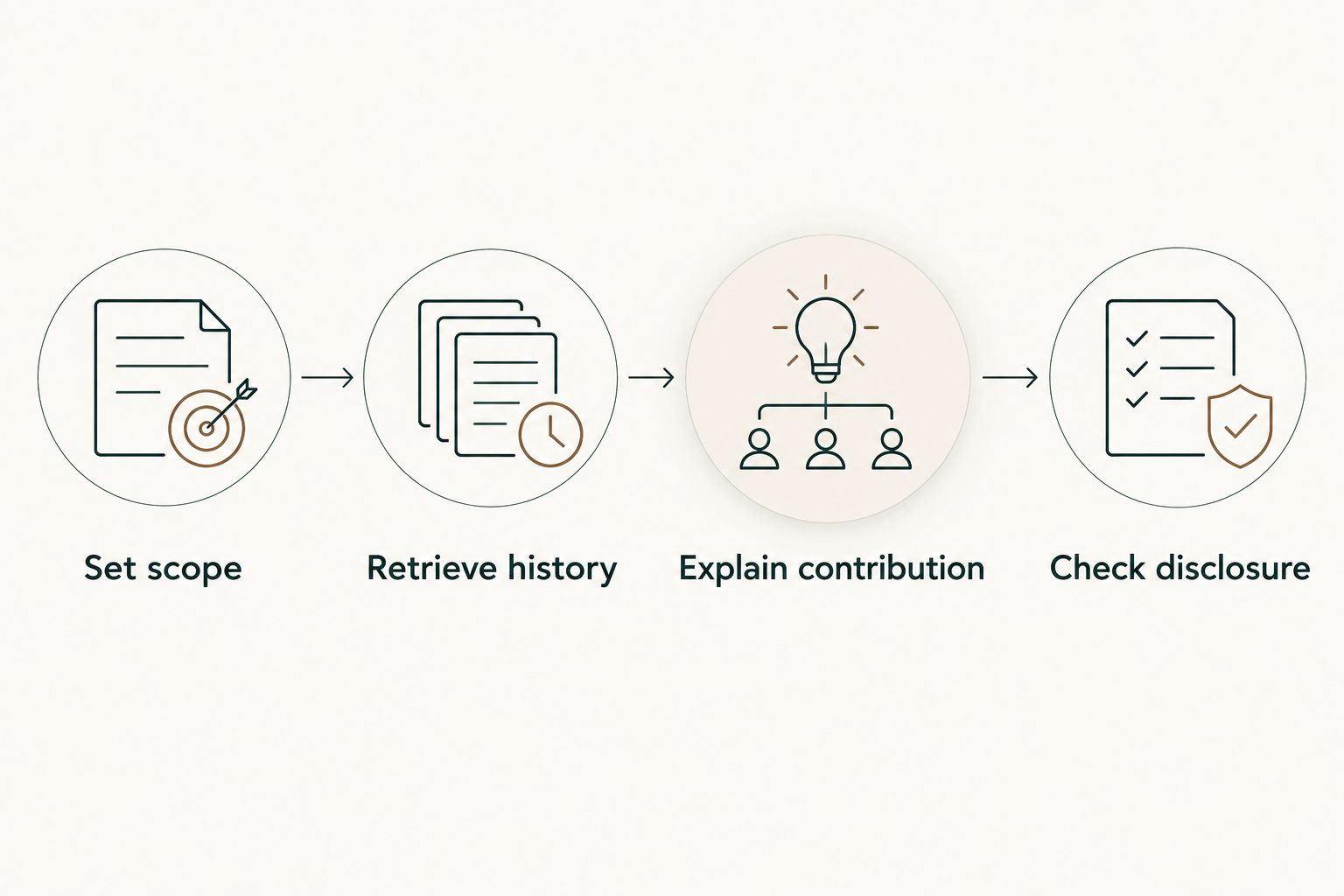
Use this sequence for each candidate example:
- Set scope: Choose the period, organization, or repository relevant to the role.
- Retrieve history: Find merged pull requests and inspect the original context.
- Explain contribution: Describe the problem, your decisions, and the work you personally handled.
- Check disclosure: Remove confidential information and confirm what you can share.
A useful private note separates evidence from claims. Record the pull request reference for your own recall, then write a shareable explanation of the problem and your contribution. Add an outcome only when you have support for it; a merge event alone is not proof of reduced incidents, faster delivery, or increased revenue.
How the options are ranked
The ranking favors the individual developer's job-search workflow: retrieving merged work, controlling scope, understanding access, and returning to original context. Monthly review comes first because it directly addresses repeated history reconstruction; targeted search, public presentation, and scripted collection each occupy a different use-case slot.
This is a workflow comparison, not a benchmark of hiring outcomes. None of these options establishes that a developer is more productive or more likely to get hired.
Which option should you choose?
Choose Pull Tally when you repeatedly need monthly merged-PR history. Choose GitHub search when you have a specific question. Improve your GitHub profile when your application needs public examples, and choose GitHub CLI when you want to maintain a repeatable collection command.
Do not build an elaborate reporting process before you know what evidence you need. Start with the role's requirements, find relevant work, and write explanations that connect your contribution to those requirements.
FAQ
What's the best GitHub activity tracking app for job seekers?
Pull Tally is the best fit for recurring monthly merged pull request review. GitHub search is the better fit for an occasional lookup, while a GitHub profile supports public portfolio presentation.
Can I find merged pull requests without another app?
Yes, GitHub search supports merged pull request queries. Use is:pr, is:merged, an author qualifier, and a merge-date range, then narrow by repository or organization when needed.
Does signing in connect my private organization repositories?
Signing in to Pull Tally alone does not connect private organization repositories. Do not assume private organization history is included simply because you have signed in.
What data does Pull Tally access?
Pull Tally uses read-only access to pull request metadata to support browsing and summarizing merged history. Its purpose is personal delivery history, not a productivity score.
Are closed pull requests the same as merged pull requests?
No, a closed pull request can be merged or closed without merging. Use is:merged when collecting evidence of integrated changes, rather than relying on is:closed.
Should I put my pull request count on my résumé?
A pull request count alone does not explain your contribution or its outcome. Use merged history to recover examples, then describe the problem, your role, and an outcome you can support.
Can recruiters see my private GitHub work?
A public profile does not give recruiters access to private repositories. Describe private work only within your employer's disclosure rules, and do not share confidential pull request content.
Is GitHub CLI better than browser search for job preparation?
GitHub CLI is better suited to a maintained command-line collection workflow; browser search is simpler for a targeted lookup. Choose based on whether you need repeatable structured output or just the original pull request.
One last thing
A pull request that looks small in a tally can contain your strongest interview story. The useful detail is often why you chose a particular fix, how you handled a constraint, or what you learned from review—not how many entries appear beside it.
Before your next 2026 application, revisit one merged change you remember as difficult. Write down the decision you made and the evidence supporting your explanation. That gives you something concrete to discuss without turning your history into a score.