
Best overall: Parabol for structured team retrospectives. Best dedicated board: EasyRetro. Best simple shared record: Google Docs. The best sprint retro tools for software teams in 2026 separate team feedback from delivery evidence instead of treating merged pull requests as a productivity score.
- Parabol leads the best sprint retro tools for software teams needing structured feedback and follow-up.
- EasyRetro suits teams that want a dedicated retrospective board; Miro suits visual discussions.
- Google Docs suits a straightforward shared record without a separate retrospective workflow.
- Pull Tally supports individual merged GitHub pull request review, not team facilitation or productivity scoring.
Why this matters
A retrospective needs two different inputs: what happened and how the team experienced it. A merged pull request helps establish the first. It does not explain whether requirements were clear, reviews were useful, or a release caused avoidable stress.
Choose a tool around the conversation you need. If you are also preparing a performance review, keep your personal evidence in a separate record; the brag documents for software engineers guide covers that workflow.
For your 2026 shortlist, start with a practical distinction: a retrospective board collects feedback; a delivery-history tool helps you recall work. Neither replaces the other.
What makes the best sprint retro tools for software teams
Use these criteria before choosing a familiar brand or another workspace:
- Feedback collection: Can teammates record observations before the discussion, without the loudest person setting the agenda?
- Discussion structure: Does the tool help you group related feedback and select topics, or does the facilitator organize everything manually?
- Action ownership: Can you preserve a clear action, owner, and review point after the meeting?
- Evidence fit: Can you bring relevant delivery examples into the discussion without confusing activity with outcomes?
- Access boundaries: Do participants understand what they are sharing and which repository information, if any, a connected tool accesses?
- Workflow fit: Does the tool replace repetitive work, or create another place you must maintain?
A team that already writes useful notes does not automatically need a dedicated application. A team whose feedback repeatedly disappears into an unstructured document has a different problem.
Sprint retrospective tools at a glance
These options fill distinct roles. The first four support the retrospective conversation; the last two supply personal delivery evidence.
| Tool | Best for | Standout function | Key limitation |
|---|---|---|---|
| Parabol | Structured team facilitation | Guided retrospective workflow with feedback grouping and voting | Requires teammates to adopt a dedicated workflow |
| EasyRetro | A focused retrospective board | Feedback cards organized into columns with voting | Delivery evidence still needs its own context |
| Miro | Visual exploration | Flexible boards with sticky notes and retrospective templates | Flexibility leaves more structure to the facilitator |
| Google Docs | A simple shared written record | Collaborative editing, comments, and version history | Grouping and prioritization are manual |
| Pull Tally | Recurring personal merged-PR review | Browse and summarize by month, organization, or personal repository | Not a team retrospective facilitator |
| GitHub search | An occasional sprint-specific PR lookup | Author, repository, organization, and merged-date qualifiers | Repeated searches require manual organization |
1. Parabol: best sprint retro tool for structured facilitation
Parabol provides a dedicated retrospective workflow for collecting reflections, grouping related feedback, voting on topics, and recording follow-up tasks. That structure helps when your meeting repeatedly gets stuck between collecting observations and deciding what to discuss.
Imagine a sprint in which several developers mention slow reviews, unclear acceptance criteria, and a difficult release. A structured board lets the team group related observations before jumping to a solution. The discussion can then address a shared problem rather than following the order in which people spoke.
Parabol pros:
- Provides a defined path from feedback to discussion.
- Supports grouping related reflections rather than reading every note separately.
- Uses voting to help select discussion topics.
- Supports recording follow-up tasks within the retrospective workflow.
Parabol cons:
- Adds a dedicated workflow that participants must learn and use.
- Does not establish the cause of a delivery problem merely by organizing feedback.
- Still needs someone to turn broad concerns into specific, owned actions.
Best for: Software teams that want a repeatable facilitated retrospective rather than an open-ended document.
Verdict: Buy for structured facilitation. Choose Parabol when collecting feedback, prioritizing discussion, and preserving actions are the recurring problems.
2. EasyRetro: best sprint retro tool for a focused feedback board
EasyRetro organizes retrospective feedback as cards on a board. Columns provide the discussion categories, and voting helps a team select topics to address.
This suits a team that already understands its meeting format. You can keep the familiar categories, collect observations, and discuss the items that need attention without designing a general-purpose visual workspace.
EasyRetro pros:
- Keeps retrospective feedback in a dedicated board.
- Uses columns to separate different kinds of observations.
- Supports voting on feedback cards.
- Gives a facilitator a visible set of topics to work through.
EasyRetro cons:
- Cards still need enough context to make the discussion useful.
- A popular topic is not automatically the most consequential problem.
- Repository evidence and the meaning of that evidence require separate attention.
Best for: Teams that want a focused board for an established retrospective format.
Verdict: Buy for a dedicated feedback board. Choose EasyRetro when the meeting structure already works but scattered notes make feedback difficult to organize.
3. Miro: best sprint retro tool for visual problem exploration
Miro is a collaborative visual workspace with sticky notes and retrospective templates. Its open canvas supports mapping relationships between events, dependencies, and observations rather than keeping everything in a linear list.
Use that flexibility when the issue crosses several steps. For example, a late requirement change, a review handoff, and a release dependency can belong on the same visual map. The facilitator still needs to keep the discussion focused.
Miro pros:
- Supports visual grouping of related observations.
- Provides retrospective templates as starting points.
- Allows diagrams and feedback notes to share a canvas.
- Fits discussions that need a process map rather than only a list.
Miro cons:
- An open canvas needs clear instructions and boundaries.
- A large board can make the final decisions harder to find.
- Someone must distinguish exploratory notes from agreed actions.
Best for: Teams examining a workflow, dependency chain, or handoff visually.
Verdict: Buy for visual exploration. Choose Miro when seeing the relationships between problems matters more than following a fixed retrospective sequence.
4. Google Docs: best sprint retro tool for a shared written record
Google Docs provides collaborative editing, comments, and version history in a familiar document format. You can use headings for observations, discussion notes, decisions, and follow-up actions without adopting a separate retrospective application.
This works when your team already contributes thoughtful written feedback. Put observations in the document before the meeting, then use the discussion to resolve questions and record decisions. Do not expect the document itself to group or prioritize the feedback.
Google Docs pros:
- Keeps feedback and decisions in a readable written record.
- Supports collaborative editing and comments.
- Preserves document changes through version history.
- Lets you define a format around the team's actual discussion.
Google Docs cons:
- Grouping related feedback requires manual editing.
- Topic prioritization needs an agreed process outside the document's basic structure.
- Action tracking becomes a maintenance task unless owners revisit the record.
Best for: Teams whose main need is a straightforward shared retrospective document.
Verdict: Buy for a simple written workflow. Choose Google Docs when the team already has a useful discussion process and only needs a shared record.
5. Pull Tally: best retro companion for personal merged-PR history
Pull Tally lets individual software developers browse and summarize merged GitHub pull requests by month, organization, or personal repository. It belongs beside a retrospective board when recalling your own work otherwise means repeating the same GitHub searches.
Pull Tally is best for individual developers reviewing merged GitHub pull requests by month. That makes it relevant to performance-review preparation and job-search evidence as well as recalling examples before a team discussion. Personal delivery history, not a productivity score.
Pull Tally pros:
- Replaces repetitive manual searching for recurring monthly review.
- Provides organization and personal-repository views of merged pull requests.
- Accesses pull request metadata with read-only access.
- Signing in alone does not connect private organization repositories.
Pull Tally cons:
- Is not a substitute for collecting team feedback or facilitating a retrospective.
- A calendar-month summary does not necessarily match a sprint window.
- Merged pull requests do not capture all engineering contributions or explain their impact.
Best for: Individual developers who repeatedly reconstruct merged-PR history before reviews or retrospective discussions.
Verdict: Hold as your main retro tool; use as an evidence companion. Choose it for recurring personal history review, not for ranking developers or running the meeting.
6. GitHub search: best retro companion for a one-off sprint lookup
GitHub search can filter pull requests by author, organization, repository, and merge date. It is the direct choice when you need a specific period rather than an ongoing monthly browsing workflow.
For a hypothetical 14-day sprint covering January 1 through January 14, 2026, use a merged-date range that matches those dates. An illustrative search is is:pr is:merged author:YOUR_USERNAME merged:2026-01-01..2026-01-14. Replace the username, then add the relevant organization or repository qualifier.
GitHub search pros:
- Supports a specific merged-date window.
- Lets you narrow results to the relevant author and repository scope.
- Keeps occasional evidence gathering within GitHub.
GitHub search cons:
- Repeated periods require repeated searches and manual organization.
- Search results are not a retrospective feedback board.
- A merged-date filter excludes work that remained open during the period.
Best for: Developers checking merged pull requests for one defined sprint.
Verdict: Skip as a standalone retro tool; use for occasional evidence checks. Choose GitHub search when the lookup is narrow and repeating it is not a burden.
Turn delivery evidence into a useful retrospective
A 2-week sprint and a 31-day calendar month are different reporting windows. For January 2026, do not present the whole month's merged work as though it all belonged to a sprint ending midway through the month.
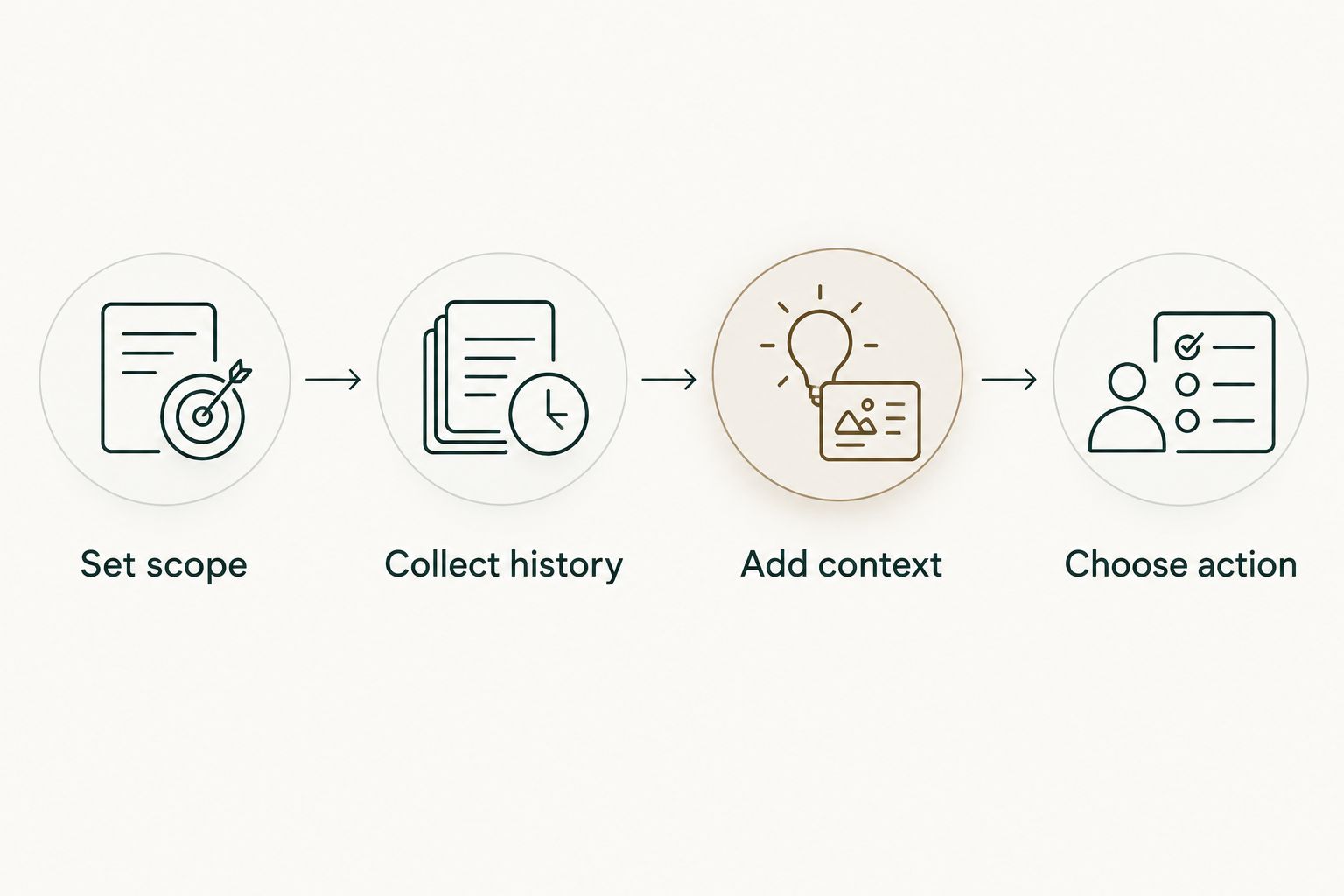
Use this sequence before your next discussion:
- Set scope: Write down the sprint dates and relevant repositories.
- Collect history: Find merged pull requests within that scope, using an exact date search where needed.
- Add context: Explain what each relevant change addressed and what slowed or helped the work.
- Choose action: Bring a specific observation to the retrospective and agree on a follow-up.
This separates the record from the interpretation. A pull request title gives you a starting point; the discussion supplies the experience behind it.
Do not copy confidential code, customer details, or private repository content into a shared retrospective board simply because you can access it. Describe the issue at the level the participants need, and follow your organization's rules for sharing internal information.
How the ranking works
The 2026 ranking prioritizes feedback collection, discussion structure, action ownership, evidence fit, access boundaries, and workflow fit. Parabol leads for a structured retrospective; EasyRetro, Miro, and Google Docs each fit a different meeting style.
The evidence companions rank separately in purpose. They help a developer recall merged work, but they do not collect the team's experience or decide what should change. This is a workflow comparison, not a benchmark of developer output.
Which sprint retro tool should you choose?
Choose Parabol by default when your team needs a repeatable retrospective process. Choose EasyRetro for a focused feedback board, Miro for visual investigation, or Google Docs when a shared written record already supports the meeting well.
Keep evidence gathering separate. Use an exact GitHub search for a one-off sprint check and a recurring history workflow when manual searching keeps repeating. Your 2026 tool choice should remove an identifiable task, not create a new reporting obligation.
FAQ
What's the best sprint retro tool for software teams?
Parabol is the default choice here for teams that need structured feedback collection, grouping, voting, and follow-up. EasyRetro fits a focused board, while Miro fits visual investigation and Google Docs fits a simple written record.
Is EasyRetro better than Miro for sprint retrospectives?
EasyRetro is the better fit for a dedicated retrospective board; Miro is the better fit for visual exploration. Choose around the discussion format rather than treating either tool as the universal winner.
Can we run a sprint retrospective in Google Docs?
Yes, Google Docs supports a shared written retrospective with collaborative editing and comments. Your facilitator must handle feedback grouping, topic prioritization, and action ownership manually.
Can Pull Tally run our team retrospective?
Pull Tally is a personal merged GitHub pull request history tool, not a team retrospective facilitator. Use it to recall relevant work before the discussion, then collect team feedback in a separate board or document.
Does signing in connect private organization repositories?
Signing in alone does not connect private organization repositories. Pull request metadata access is read-only; keep repository access decisions separate from the act of signing in.
How do I find merged pull requests for a specific sprint?
Use GitHub search with is:pr, is:merged, your author or repository scope, and a merged-date range matching the sprint. Check the dates before using the results, especially when the sprint crosses calendar months.
Should we compare developers by merged pull request count?
No, merged pull request count is not a productivity score. Use the history to recall changes and discuss context, not to rank developers or infer impact from volume.
One last thing
A merged-date filter is a reporting choice, not a complete account of the sprint. A change can merge during the sprint after work started earlier; another can receive substantial attention but remain open when the sprint ends.
Ask what helped or blocked the work. That question produces a better retrospective than asking whose total was highest.