
Best overall for writing the packet: Google Docs. Best for rebuilding merged pull request history: Pull Tally. Best for an occasional lookup without another tool: GitHub search. The best tools for engineers preparing promotion packets in 2026 separate evidence collection from the explanation of your impact.
- The best tools for engineers preparing promotion packets separate delivery evidence from promotion criteria.
- Pull Tally is best for rebuilding merged GitHub pull request history across months and organizations.
- Google Docs is the default for drafting a promotion packet and collecting reviewer comments.
- GitHub search suits occasional lookups; Notion suits ongoing brag documents; Google Sheets suits evidence mapping.
Why this matters
A merged pull request shows that a change landed. It does not establish the customer outcome, your ownership, or whether the work demonstrates the next engineering level. Your packet needs both the source record and your explanation.
Start with your employer's promotion criteria for the 2026 review cycle. Then collect evidence against those criteria. A tool that makes your activity easier to browse helps with recall; it does not decide whether you deserve promotion.
Use a delivery-history tool to recover work, not to calculate a productivity score. Keep design decisions, mentoring, incident response, and cross-team coordination in the packet even when those contributions have no merged pull request attached.
What makes the best promotion-packet tools
Choose tools by the job you need done, rather than moving your entire review process into a new application.
- Evidence retrieval: Can you find the relevant merged changes without repeating the same searches?
- Scope control: Can you separate the review period, employer work, and personal repositories?
- Context capture: Can you explain the problem, your decisions, and the result alongside the evidence?
- Reviewer collaboration: Can your manager or peer identify gaps and comment on the draft?
- Permission clarity: Do you understand what repository data a tool accesses and who can see your notes?
- Evidence traceability: Can a reviewer get from an achievement claim back to its supporting record?
No option below handles every part of that workflow. Keep the source history separate from the argument you make about it.
Promotion-packet tools at a glance
| Tool | Best for | Standout function | Key limitation |
|---|---|---|---|
| Pull Tally | Rebuilding merged PR history | Browse and summarize merged GitHub PRs by month, organization, or personal repository | Merged PR history does not explain impact or cover every contribution |
| Google Docs | Writing the final packet | Shared document editing and comments | You must collect and organize evidence separately |
| GitHub search | Occasional source lookups | Search qualifiers for author, merge status, repository, and date | Repeated searches leave the narrative work to you |
| Notion | Keeping an ongoing brag document | Pages and databases for contextual notes | Useful history depends on maintaining those notes |
| Google Sheets | Mapping evidence to criteria | Rows, columns, filters, and sorting | A tracking grid is not a finished promotion narrative |
The order starts with evidence recovery, then covers writing, targeted lookup, ongoing notes, and evidence organization. Google Docs is the default writing choice; the other tools solve different preparation problems.
1. Pull Tally: best for recovering merged PR history
The tool lets individual developers browse and summarize merged GitHub pull requests by month, organization, or personal repository. Use it when preparing your packet means repeatedly searching GitHub to reconstruct what you delivered.
Pull Tally is best for engineers who need merged GitHub pull request history for a promotion packet. It gives you a delivery record to investigate, not a ready-made claim about seniority or business impact.
For a 2026 review, browse the relevant months and identify changes that deserve a closer look. Then add the context a repository record cannot supply: why the work mattered, which decisions you owned, and what changed after delivery.
Pros:
- Organizes merged PR history around months and repository scope.
- Fits an individual developer's retrospective preparation workflow.
- Replaces repetitive manual searching when you need recurring history summaries.
- Uses read-only access to pull request metadata.
Cons:
- Merged changes do not capture all mentoring, planning, or operational work.
- A PR tally does not establish complexity, quality, or impact.
- You still need a separate place to write your promotion argument.
Permissions: Signing in alone does not connect private organization repositories. Treat access to employer repositories as a separate decision, and follow your organization's rules before connecting work data.
Best for: Developers who remember the projects but need help recovering the merged changes behind them.
Verdict: Buy into this workflow when repeated GitHub searching is the bottleneck; skip it for a single lookup.
2. Google Docs: best for writing the final promotion packet
Google Docs gives you a shared document for drafting, comments, and revisions. It is the default here because the final task is explaining your work in a format that a reviewer can read and challenge.
Use your employer's required template when one exists. Otherwise, organize the document around promotion criteria and put evidence beside the relevant claim, rather than appending an unexplained list of links.
A useful paragraph states the problem, your responsibility, the decision you made, and the result you can support. Ask a reviewer to comment on missing context, not just grammar. A polished sentence cannot repair an unsupported achievement claim.
Google Docs pros:
- Supports a narrative with headings and linked evidence.
- Lets collaborators comment on specific passages.
- Keeps the draft and revisions in the same document.
Google Docs cons:
- Does not automatically reconstruct your GitHub delivery history.
- Requires deliberate organization as evidence accumulates.
- Sharing settings need attention when the document contains employer information.
Best for: Engineers who have enough evidence and need to turn it into a readable, reviewable packet.
Verdict: Buy into Google Docs for the final draft unless your employer requires a different format.
3. GitHub search: best for occasional evidence lookups
GitHub search finds pull requests using qualifiers such as author, repository, merge status, and merge date. Use it when you know the scope and need a specific set of source records, rather than an ongoing history-browsing workflow.
For an example January-through-March 2026 review window, search with is:pr is:merged author:YOUR_USERNAME merged:2026-01-01..2026-03-31. Replace YOUR_USERNAME with your GitHub username and add a repository or organization qualifier when needed.
That example covers 3 calendar months. A separate search using merged:2026-04-01..2026-06-30 covers the next 3 calendar months. Together, the examples cover a 6-month preparation window without mixing the two periods.
These are search examples, not a required review schedule. Match the dates to your actual review period, and remember that merge date describes when a change landed—not when all the work happened.
GitHub search pros:
- Keeps your lookup close to the original pull request record.
- Supports explicit author, date, and repository boundaries.
- Works well for answering a narrow evidence question.
GitHub search cons:
- Repeated lookups require you to manage the query boundaries yourself.
- Search results still need interpretation and written context.
- Author-filtered searches do not represent every form of collaboration.
Best for: Developers checking a project, a date range, or a small set of remembered changes.
Verdict: Buy into GitHub search for occasional lookups; skip repeated manual searches when history reconstruction dominates preparation.
4. Notion: best for maintaining an ongoing brag document
Notion provides pages and databases for keeping work notes in one place. Use it to record the context you will struggle to reconstruct later: a difficult trade-off, a blocked dependency, a mentoring conversation, or the reason a project changed direction.
Keep entries short enough that you will maintain them. Record the contribution, supporting evidence, and promotion criterion it might demonstrate. Include a result only when you can support it.
For your next 2026 review, this ongoing record gives you material beyond merged code. It still needs editing: a diary of tasks is not the same as a packet organized around expectations for the next level.
Notion pros:
- Keeps narrative notes beside links to supporting records.
- Supports both free-form pages and structured databases.
- Fits contributions that do not produce a pull request.
Notion cons:
- Its usefulness depends on you recording context as work happens.
- Flexible organization can become an extra maintenance task.
- Retrospective notes still require verification against source evidence.
Best for: Engineers who want to preserve context throughout the review period instead of rebuilding it at the deadline.
Verdict: Buy into Notion if you will maintain the notes; skip a complex setup you will not use.
5. Google Sheets: best for mapping evidence to promotion criteria
Google Sheets gives you a sortable grid for connecting contributions to review criteria. Use a row for each meaningful contribution and columns for the criterion, your role, the supporting record, and the result.
This is useful when you have plenty of activity but cannot see whether the evidence supports the requested level. Filtering by criterion exposes empty categories and helps you find claims that still lack a source.
Do not assign a numeric promotion score to each row. The purpose is to organize evidence, not to imply that different contributions are interchangeable units of performance.
Google Sheets pros:
- Makes evidence gaps visible in a structured layout.
- Supports sorting and filtering by criterion or project.
- Helps separate an achievement claim from its supporting source.
Google Sheets cons:
- Long explanations are harder to read in cells than in a document.
- You must maintain the rows and evidence links yourself.
- A completed grid still needs a readable narrative.
Best for: Engineers sorting a large evidence collection before choosing what belongs in the packet.
Verdict: Buy into Google Sheets for evidence organization; skip it when a short document already makes the mapping clear.
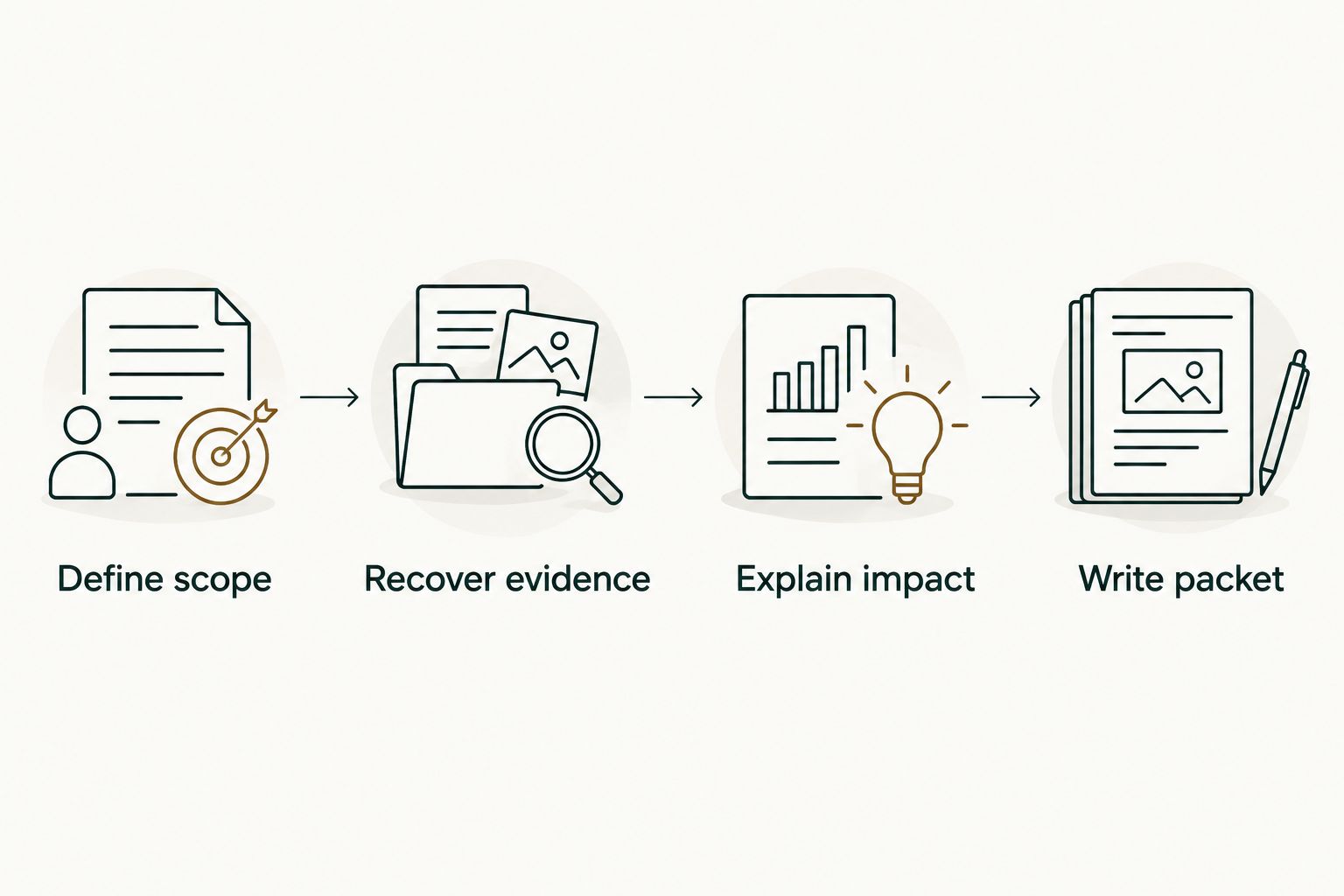
How to turn these tools into a packet
Choose a small workflow that matches your actual gap. Do not adopt every tool in the table.
Define scope
Write down the review period, the target level, and the relevant promotion criteria. Keep personal repository work separate unless your employer's process explicitly accepts it as evidence.
Recover evidence
Find the merged changes and other records that support your contributions. Use history browsing for repeated reconstruction or GitHub search for a narrow lookup; do not maintain both just to duplicate the same list.
Explain impact
For each candidate achievement, describe your responsibility and the result you can verify. Distinguish your decisions from the team's outcome, and remove claims that the evidence does not support.
Write packet
Select the strongest examples, organize them by criterion, and ask for feedback. Keep supporting records accessible to the intended reviewer without expanding access to confidential material.
Keep the evidence list as working material. The submitted packet should explain why selected contributions meet the criteria, not make the reviewer reconstruct that argument from raw activity.
How the recommendations were ranked
These recommendations match distinct preparation jobs: evidence retrieval, final drafting, targeted searching, ongoing context capture, and criterion mapping. The comparison uses the functions described above, not a claimed hands-on test or a productivity ranking.
The best tool is the one that removes your current preparation bottleneck without obscuring the source evidence. Permission clarity matters most when a workflow touches private repository data or confidential review notes.
Which promotion-packet tools should you choose?
Start with Google Docs and the source records you already have. Add a history-browsing tool only when reconstructing merged work takes repeated searches; add Notion for ongoing context or Google Sheets when the evidence needs sorting.
For a 2026 packet, make the decision based on the missing step. More tools do not supply missing ownership, impact, or evidence. A smaller workflow with clear claims is easier for you to maintain and easier for a reviewer to assess.
FAQ
What's the best tool for writing an engineering promotion packet?
Google Docs is the default recommendation for drafting the packet and collecting reviewer comments. Use your employer's required format when one exists, and organize the evidence around the promotion criteria.
What's the best way to recover my merged GitHub pull request history?
Use a history-browsing tool for repeated reconstruction and GitHub search for an occasional lookup. Filter the review period and repository scope before selecting evidence for your packet.
Does signing in connect my private organization repositories?
Signing in alone does not connect private organization repositories to the delivery-history tool recommended here. Its access is read-only pull request metadata; follow your employer's rules before connecting work repositories.
Can I use my pull request count as evidence that I deserve promotion?
A pull request count is delivery history, not a productivity score or proof of promotion readiness. Explain the responsibility, decisions, and verified outcomes behind selected changes.
Is Notion better than Google Docs for a promotion packet?
Notion is better suited to ongoing contextual notes, while Google Docs is the default here for the final narrative and reviewer comments. You do not need both if one approved document already supports your workflow.
How do I include mentoring or incident response without a pull request?
Use an appropriate supporting record and explain your role in the contribution. Keep confidential details within your employer's approved review process, and connect the example to a relevant promotion criterion.
Should I include personal repository work in my promotion packet?
Include personal repository work only when your employer's promotion process accepts it as relevant evidence. Keep it separate from employer delivery history so the reviewer can understand the scope.
One last thing
Before adding another achievement, check the weakest sentence in your draft. If it says only that you merged or shipped something, add the problem, your responsibility, and the supported result—or remove it. The packet needs an argument, not a longer activity list.