
Best overall: Pull Tally for browsing merged PR history across a review period. Best for an occasional lookup: GitHub search. Best for a repeatable terminal workflow: GitHub CLI. The best tools to generate self review summaries from GitHub PRs help you find the work; you still need to explain its outcome.
- Pull Tally is the best tool to generate self review summaries from GitHub PRs when you need recurring merged-PR history.
- Use GitHub search for an occasional PR lookup and GitHub CLI for repeatable terminal queries.
- Choose a 3-month review window, group related PRs, and write about outcomes rather than PR counts.
- Pull Tally has read-only access to pull request metadata; signing in alone does not connect private organization repositories.
Why this matters
A performance review asks what you changed and why it mattered. A list of merged PRs answers a narrower question: which changes made it into the codebase. In 2026, the useful workflow is to find the relevant PRs, group related changes, then check issues, release notes, or your own notes for the outcome. Personal delivery history is not a productivity score.
If you are preparing for a job search, the same distinction applies. A PR title can remind you of a project, but it cannot by itself establish adoption, reliability improvements, or business impact. Keep the summary tied to what you can verify.
What makes the best GitHub PR self-review tool
Use these criteria before choosing a tool. The right choice depends on how often you prepare a review and whether you need a finished inventory or a custom reporting process.
- Merged-PR scope: Start with work that actually merged. Keep unmerged proposals separate so the review does not imply they shipped.
- Review-period filtering: Find work within the months your review covers, rather than sorting through your entire account history.
- Repository coverage: Check whether you can examine the personal repositories and organizations relevant to your review. Access permissions still apply.
- Context retrieval: Preserve a path back to each PR so you can check the discussion, linked issue, and outcome before writing a claim.
- Setup burden: Match the workflow to the task. A one-time lookup does not need a reporting script; a recurring report might.
- Permission clarity: Know what a tool reads and whether signing in grants it access to private organization repositories.
Best tools to generate self-review summaries at a glance
| Tool | Best for | Standout feature | Key limitation |
|---|---|---|---|
| Pull Tally | Recurring personal review preparation | Browse and summarize merged PRs by month, organization, or personal repository | PR history alone does not establish impact |
| GitHub search | Occasional PR lookup | Search PRs in GitHub | Repeated searches take manual work to turn into a review |
| GitHub CLI | Repeatable terminal queries | Run GitHub PR searches from the command line | Query results still need interpretation and a written summary |
| GitHub API | A custom reporting workflow | Build a report around the fields and grouping you choose | You must build and maintain the workflow |
The table separates finding evidence from writing the review. None of these options can verify an outcome merely by counting PRs. That matters most when a review spans work in several repositories or when one project consists of many small changes.
1. Pull Tally: best for recurring merged-PR history
Pull Tally is a web tool for individual software developers to browse and summarize their merged GitHub pull requests by month, organization, or personal repository. It replaces repetitive manual searches when you need to reconstruct what merged during a review period. Browse the monthly history, then open the underlying work you need to describe accurately.
Suppose your 2026 self-review covers 3 months across a personal repository and organization work. Start by separating those sources, then look for related PRs within each month. A series of fixes can become one review point about the problem you addressed; it should not become a claim that each PR had a separate measurable outcome.
Pull Tally pros:
- Groups merged-PR history around month, organization, and personal repository views.
- Supports browsing and exporting monthly history for review preparation.
- Uses read-only access to pull request metadata.
- Gives an individual developer a starting inventory without repeatedly rebuilding GitHub searches.
Pull Tally cons:
- A merged-PR summary cannot tell you whether a change achieved its intended result; verify that separately.
- It is not a productivity score or a substitute for explaining collaboration and work that did not end in a merged PR.
- Signing in alone does not connect private organization repositories; access requires a separate connection decision.
Best for: An individual developer who prepares reviews regularly and needs to browse merged work across months or repositories. Verdict: Use it for the PR inventory, then write the outcome in your own words.
2. GitHub search: best for an occasional PR lookup
GitHub search is the direct choice when you need to answer a contained question, such as which PRs you merged in a particular repository during a given month. Search for the relevant author, merged status, repository, and date range, then inspect the results. You stay close to the PR discussion while deciding which changes belong in your review.
For a 2026 review, use GitHub search when you remember the project but not the PR title. Open the matching PRs and check whether the description, review discussion, and linked work support the point you want to make. If your review covers several months and repositories, expect to repeat that process for each slice of work.
GitHub search pros:
- Works well for checking a specific change or a short review period.
- Keeps each result close to its code and discussion context.
- Does not require you to create a separate reporting workflow.
GitHub search cons:
- You must repeat and reconcile searches when the scope spans multiple repositories or periods.
- Search results are not a finished self-review; you still need to group PRs and explain outcomes.
Best for: A developer who needs an occasional lookup or wants to verify a specific statement before submitting a review. Verdict: Use it for focused research; skip the repeated manual search workflow when review preparation becomes routine.
3. GitHub CLI: best for repeatable terminal queries
GitHub CLI lets you search GitHub PRs from the command line. It suits developers who already work in a terminal and want to repeat a query while assembling review evidence. Save the query parameters that match your review scope, inspect the results, and keep your written interpretation separate from the command output.
The advantage is repeatability, not automatic insight. If you are preparing a 2026 self-review now and expect another review later, a saved command can reduce the work of remembering how you searched. It does not decide which PRs represent one project, whether a change reached users, or what credit belongs in your narrative.
GitHub CLI pros:
- Makes a search procedure easy to repeat from the terminal.
- Fits a workflow that already uses command-line tools.
- Gives you a way to inspect PR results before selecting evidence.
GitHub CLI cons:
- Requires command-line setup and a query you can maintain.
- Raw query results still need grouping, context checks, and prose.
- A command that covers only one repository will miss work elsewhere unless you expand its scope.
Best for: A developer comfortable maintaining a repeatable PR-search workflow in the terminal. Verdict: Use it when repeatable queries matter more than a ready-to-browse monthly view.
4. GitHub API: best for a custom reporting workflow
The GitHub API is the option when you need to build a report around your own definitions. You can write a script to retrieve the PR information your access permits, organize it around your review period, and produce the structure you want to inspect. This is a development task, not a ready-made self-review summary.
Choose this route only when the report needs a shape the simpler options do not provide. For example, you might want a consistent way to group work by repository before reviewing each project. You remain responsible for authentication, the search logic, missing results, and changes to the script.
GitHub API pros:
- Lets you define the reporting workflow rather than adapt to a fixed view.
- Can make recurring, specific grouping rules repeatable.
- Keeps the retrieval logic available for you to inspect and change.
GitHub API cons:
- Requires implementation and ongoing maintenance.
- API output is evidence to review, not a verified account of impact.
- An incomplete query or access scope can leave relevant work out of the report.
Best for: A developer with a specific reporting requirement and time to maintain the code. Verdict: Build it only when the custom output justifies the extra work.
Turn a PR inventory into a self-review
For a 2026 review, start with a defined period, such as 3 months, rather than a lifetime PR count. Then move from individual changes to projects and from projects to claims you can support. These steps work whether your starting point is a monthly view, a GitHub search, a terminal query, or an API report.
- Choose the review window. Write down its start and end dates and the repositories you intend to include. If organization access is relevant, confirm which repositories you can actually inspect.
- Collect merged PRs. Keep links or identifiers with the inventory so you can return to the original discussion. Do not treat an unmerged proposal as delivered work.
- Group related changes. Put PRs addressing the same project or problem together. One project can involve several PRs, while one PR can contain work that needs more explanation.
- Check the outcome. Read the PR, linked issue, release note, or other record that supports your account. If you cannot establish an outcome, describe the change without inventing one.
- Write the review point. Use 2 sentences if that is enough: state the problem and your contribution, then state the supported result or what you learned. Name collaborators where their work is part of the story.
The sequence protects you from two common errors: treating PR volume as performance and turning a PR title into an unsupported impact claim. Keep work without a merged PR in a separate set of notes so your review covers more than code that happened to appear in search results.
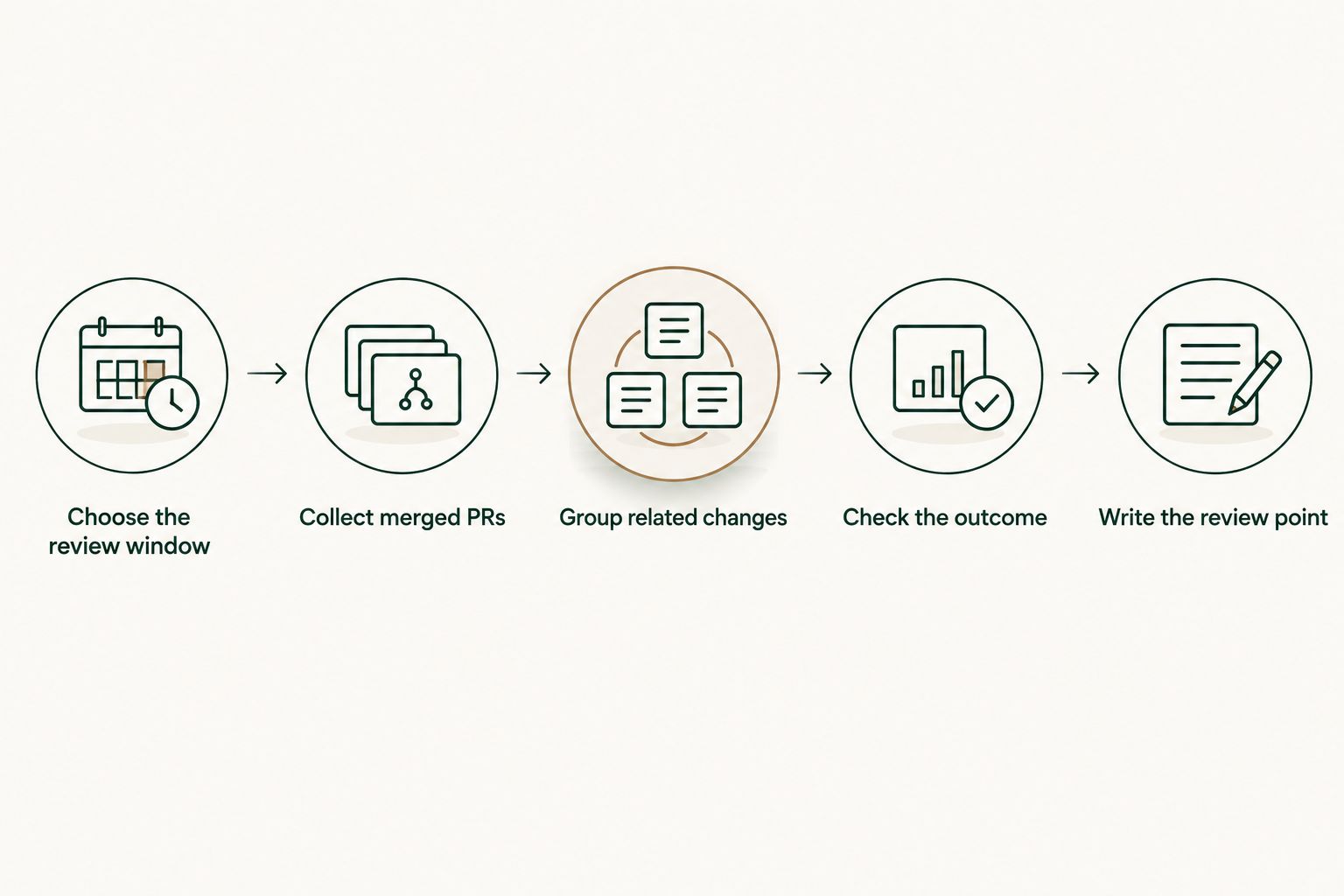
If repeated GitHub searches are the slow step, use a monthly merged-PR view to assemble the inventory. Keep the final review focused on the work and its supported outcome.
Browse your merged PR history
Review merged pull requests by month, organization, or personal repository.
How we ranked these options
The order reflects fit for an individual developer preparing a self-review, not a claim that PR count measures performance. A recurring inventory ranks first because it removes repeated searching; GitHub search ranks next because it is the simpler choice for one lookup. GitHub CLI serves developers who prefer repeatable terminal queries, while the GitHub API belongs last for most readers because a custom report requires code to build and maintain.
The same criteria apply in 2026 regardless of tool: merged status, review-period coverage, repository scope, access clarity, and a way back to the original PR. A tool moves down the list when it adds work without improving the evidence you need.
Which tool should you choose?
Choose Pull Tally if your 2026 review requires recurring access to merged PR history by month, organization, or personal repository. Choose GitHub search if you need to confirm one project or a small set of PRs. Choose GitHub CLI if you want to rerun your own searches from a terminal, and use the GitHub API only when you have a specific custom report to build.
Whichever option you choose, keep the final summary selective. A strong self-review does not need every merged PR in the body of the document. It needs claims you can trace back to the work, with outcomes stated only when you have evidence for them.
FAQ
What's the best tool for generating a self-review summary from GitHub PRs?
Pull Tally is the best fit for an individual developer who repeatedly needs a monthly inventory of merged PRs. Use the inventory to identify projects, then verify outcomes before writing the review.
Can GitHub PRs write my performance review for me?
No. PRs document changes and discussion, but they do not establish the full impact of your work or capture every contribution. Group related PRs and add only outcomes you can support.
Is GitHub search better than a dedicated PR history tool?
GitHub search is better for an occasional, focused lookup. A dedicated history view is more useful when you repeatedly review merged work across months or repositories.
Should I count every merged PR in my self-review?
No. Use merged PRs to find relevant work, then organize the review by project or problem. A PR count is personal delivery history, not a productivity score.
Does signing in to Pull Tally connect private organization repositories?
No. Signing in alone does not connect private organization repositories. Check the connection and permission decision separately before including organization work in your review.
What data does Pull Tally access?
Pull Tally has read-only access to pull request metadata. It uses that information to let individual developers browse and summarize merged PR history by month, organization, or personal repository.
When should I use the GitHub API for a self-review?
Use the GitHub API when you need a custom report that simpler searches or history views do not provide. You must build and maintain the retrieval and grouping workflow yourself.
One last thing
Before you submit a 2026 self-review, take the strongest claim in it and trace it back to its evidence. If the PR proves the change but not the result, rewrite the sentence to describe the change. That single check does more for accuracy than adding another page of PRs.