
Best overall: Pull Tally for individual developers preparing a self-review from merged GitHub pull requests. Best for a one-off lookup: GitHub search. Best for work that never appears in a repository: a brag document. Jira helps when your team tracks assignments in tickets; 15Five fits a review process your organization already uses. These are different sources of evidence, not interchangeable measures of engineering performance.
- Pull Tally is the best software engineer self review tool for browsing merged GitHub pull requests by month.
- Use GitHub search when you need to find a particular pull request, not assemble a recurring monthly summary.
- Keep a brag document for mentoring, design decisions, and other work a merged-PR list cannot explain.
- Use Jira tickets and 15Five review forms when your team already maintains them.
Why this matters
A self-review asks what you contributed during a defined period. If you start by scrolling through GitHub on the day the review is due, you have to reconstruct both the work and its context from memory. A merged pull request can confirm that a change landed; it cannot tell your manager why that change mattered.
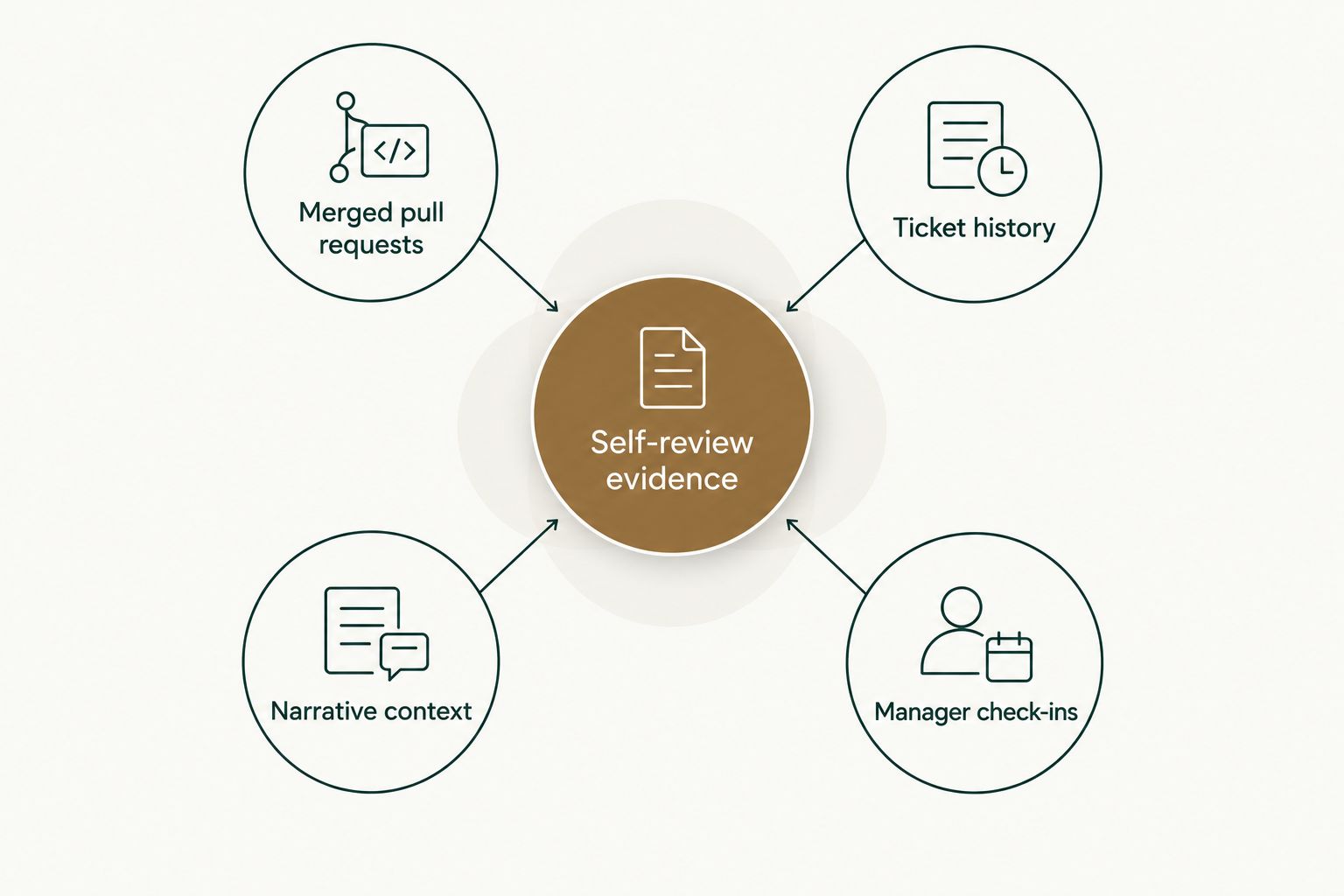
Separate your self-review evidence into merged pull requests, ticket history, narrative context, and manager check-ins. The first shows code that merged. The second helps connect work to assigned priorities. The third explains decisions, collaboration, and outcomes. The fourth belongs to the formal review process, if your employer has one.
For a 2026 review, start with the evidence you can verify, then write the explanation yourself. Do not turn a PR tally into a productivity score: pull requests differ in scope, and important engineering work does not always produce one.
What makes the best self-review tool
- Relevant evidence. Choose a tool that records the kind of work you need to discuss. A PR list will not replace a note about mentoring or an incident response.
- A usable time view. You should be able to isolate the period under review without rereading unrelated activity. Monthly grouping helps when you need to work through 2026 in order.
- Clear access boundaries. If a tool connects to GitHub, check what it reads and whether signing in connects organization repositories.
- Low-effort retrieval. An occasional lookup does not justify a new workflow. Repeating the same search across months is a different problem.
- Copyable evidence. The result needs to help you write your review, whether that means exporting a history or taking specific examples into a document.
- Room for judgment. Counts identify activity. You still have to explain the problem, your contribution, and the result without treating volume as performance.
Self-review tools at a glance
| Tool | Best for | Standout feature | Key limitation |
|---|---|---|---|
| Pull Tally | Monthly merged-PR history | Browse by month, organization, or personal repository | PR history cannot explain work outside merged PRs |
| GitHub search | Finding a particular PR | Search by author, merge status, and date | You must repeat searches to build a period-by-period summary |
| Brag document | Recording context and non-code work | Your own explanations sit beside accomplishments | You must maintain it yourself |
| Jira | Reviewing assigned ticket work | Ticket history connects work to tracked tasks | Ticket status does not establish what code merged |
| 15Five | Completing an existing formal review | Review prompts provide a place to write responses | A form does not assemble your PR evidence |
The distinction in the table matters when your deadline is close. If you need to identify merged changes, begin with a PR source. If you already know which changes to discuss but cannot explain their significance, open your notes instead. Adding another dashboard will not supply the missing context.
1. Pull Tally: best for monthly merged-PR history
Pull Tally is a web tool for individual developers to browse and summarize their merged GitHub pull requests by month, organization, or personal repository. That makes it the most direct choice here when your 2026 self-review starts with a question like: What did I merge during each month of this review period? You can browse and export monthly history rather than repeat searches for every month.
Access to pull request metadata is read-only. Signing in alone does not connect private organization repositories. Those distinctions matter if you want to check your personal history before deciding whether organization repositories belong in your review.
Pull Tally pros:
- Groups merged pull requests by month, so you can work through the review period in order.
- Lets you browse organization or personal-repository history instead of mixing every context together.
- Supports a repeatable review-preparation task without turning PR counts into a productivity score.
Pull Tally cons:
- A merged-PR history does not capture mentoring, discussions, or work that never became a merged PR.
- A PR title alone cannot establish the outcome or significance of a change.
- It is not the right starting point when your review is primarily about ticket work or written feedback.
Best for: An individual developer who needs to reconstruct merged work across multiple months. Verdict: Buy for that task; pair the history with your own account of why the work mattered.
2. GitHub search: best for a one-off PR lookup
GitHub search is the shortest route when you remember a repository, author, or approximate merge date and need to find a specific pull request. For example, a search using is:pr is:merged author:USERNAME narrows results to merged PRs authored by that account. Add a supported merge-date filter when you need a particular part of 2026.
The trade-off is repetition. Searching once to verify a change is straightforward. Searching separately to rebuild each month of a longer review period asks you to do the grouping yourself. Keep the search results as evidence, then write what the changes accomplished in your review document.
GitHub search pros:
- Starts in the repository system where the PRs already live.
- Filters results when you have a specific author, status, or date in mind.
- Lets you inspect the PR itself before you describe its contribution.
GitHub search cons:
- A search result is not a written self-review or an explanation of impact.
- Repeated searches make a multi-month history harder to assemble.
- Authored PRs alone omit reviews, mentoring, and other contributions.
Best for: An occasional lookup or verification of a particular merged change. Verdict: Hold as your sole preparation method if you need to summarize month after month.
3. Brag document: best for context a PR list misses
A brag document is a running record you write for yourself. Use it to explain contributions that are difficult to recover later: a design choice you helped settle, a teammate you supported, or a production issue you investigated. You can also record why a merged change mattered while its context is still fresh.
The document works because it holds your interpretation alongside the evidence. A PR link can show the change; your note can identify the problem and your role. For a 2026 review, organize entries by month or by the categories in your employer's review form. Use whichever structure makes examples easy to retrieve.
Brag document pros:
- Captures collaboration and decisions that a merged-PR tally cannot measure.
- Gives you a place to record context at the time, rather than invent it later.
- Works beside GitHub or ticket history instead of competing with them.
Brag document cons:
- You have to add entries yourself.
- Missing notes cannot reliably be recreated from memory at review time.
- A claim in the document still needs a specific example when evidence is available.
Best for: Explaining contributions, especially those without a merged PR. Verdict: Buy as a habit, not as a substitute for checking the underlying work.
4. Jira: best for reviewing assigned ticket work
Jira helps when your team uses tickets to define work and keeps their status current. Review the tasks assigned to you during the relevant period, then identify the ones that deserve a place in your self-review. A ticket can help you explain the request or priority behind a change; the linked work and your own account establish what you contributed.
Be careful with status. A completed ticket is not automatically proof that you authored a merged PR, and an important contribution can happen on a ticket assigned to someone else. Use Jira as a map of tracked work, not a substitute for checking the work itself.
Jira pros:
- Gives you a starting list when your team organizes work through tickets.
- Preserves task descriptions that can help explain the reason for a change.
- Supports a review structured around tracked projects or assignments.
Jira cons:
- Its usefulness depends on how consistently your team maintains tickets.
- Ticket status does not tell the full story of an engineer's contribution.
- Untracked mentoring, reviews, and discussions remain outside the record.
Best for: An engineer whose team already maintains useful ticket history. Verdict: Hold as the only evidence source; check the underlying work before making a claim.
5. 15Five: best for an existing formal review process
15Five belongs in a different slot from a PR-history tool. If your employer uses it for performance reviews, its prompts give you a place to submit the answers your manager expects. Prepare the evidence first, then write those answers using specific examples from your merged work, tickets, and notes.
Do not start with the form and hope it will remind you what happened. A prompt asking about accomplishments does not identify the PR you merged or recover the reasoning behind a decision. The form is where you communicate your review, not where you reconstruct every contribution.
15Five pros:
- Keeps your responses in the review process your employer already uses.
- Provides prompts you can answer with specific examples.
- Gives you a final place to bring code and non-code evidence together.
15Five cons:
- A review prompt does not produce a month-by-month merged-PR history.
- You still need to select and explain the evidence yourself.
- Its value to an individual depends on whether their employer uses it for reviews.
Best for: An engineer completing a review in an existing 15Five process. Verdict: Skip as a separate tool to adopt solely to find your PR history.
How these tools were ranked
The ranking starts with the task behind this search: an individual software engineer preparing a self-review. A tool ranks higher when it helps that person recover specific evidence without requiring a team-wide change. The criteria also separate evidence collection from review writing, because the same tool does not have to do both jobs.
For a code-centered 2026 review, monthly merged-PR history is more immediately useful than a formal review form. GitHub search follows because it finds the source material, but asks you to assemble the longer timeline yourself. A brag document ranks next for a different reason: it records the meaning of contributions that repository history cannot establish. Jira and 15Five move up only when they are already part of your team's workflow.
No ranking turns a PR count, ticket count, or completed form into a performance score. Judge each example by the work and context it documents.
Which self-review tool should you choose in 2026?
Choose Pull Tally if the first job is to reconstruct your merged GitHub work by month. Use GitHub search if you need only a particular PR. Keep a brag document alongside either approach so you can explain design decisions, collaboration, and outcomes that a list of changes cannot express.
If your team tracks work in Jira, check tickets to reconnect changes with their original requests. If your employer reviews you through 15Five, bring the evidence into that form after you have gathered it. You do not need to treat a formal review platform as a replacement for your personal work history.
Before writing the final response, pick a few changes you can discuss accurately. For each, identify the problem, what you did, and what the available evidence shows. If the outcome is not documented, do not invent one. That approach produces a more useful 2026 review than a longer list of PR titles without explanation.
Browse your merged PRs
Review merged GitHub pull requests by month, organization, or personal repository.
FAQ
What's the best software engineer self review tool for merged PRs?
Pull Tally is the best fit on this list for browsing and summarizing your merged GitHub pull requests by month. Use a separate document to explain the significance of those changes.
Can GitHub search replace a self-review tool?
GitHub search works for finding particular pull requests. If you need a recurring monthly summary, you must repeat the searches and organize the results yourself.
Does signing in to Pull Tally connect my private organization repositories?
No. Signing in alone does not connect private organization repositories. Access to pull request metadata is read-only.
Should I count pull requests in my performance review?
A PR count can help you locate merged work, but it is not a productivity score. Explain the contribution and its context rather than treating the number of PRs as the result.
What belongs in a software engineer brag document?
Record specific work and the context you might otherwise forget, including decisions, collaboration, and the reason a change mattered. Check PRs and tickets when you need to verify a detail.
Is Jira enough for a software engineer self-review?
Jira is useful when your team keeps ticket history current, but a ticket does not prove which code merged or capture every contribution. Check the underlying work and add context in your own words.
Do I need 15Five to prepare my self-review?
No. Use 15Five if your employer already uses it to collect review responses. You can gather PRs, tickets, and notes without adopting a formal review platform yourself.
One last thing
Your review period has an end date; your memory does not keep a clean boundary. When you work through a 2026 merged-PR history, check the merge date before including a change. Then ask whether the PR demonstrates the claim you plan to make. Evidence first, explanation second, count last.