
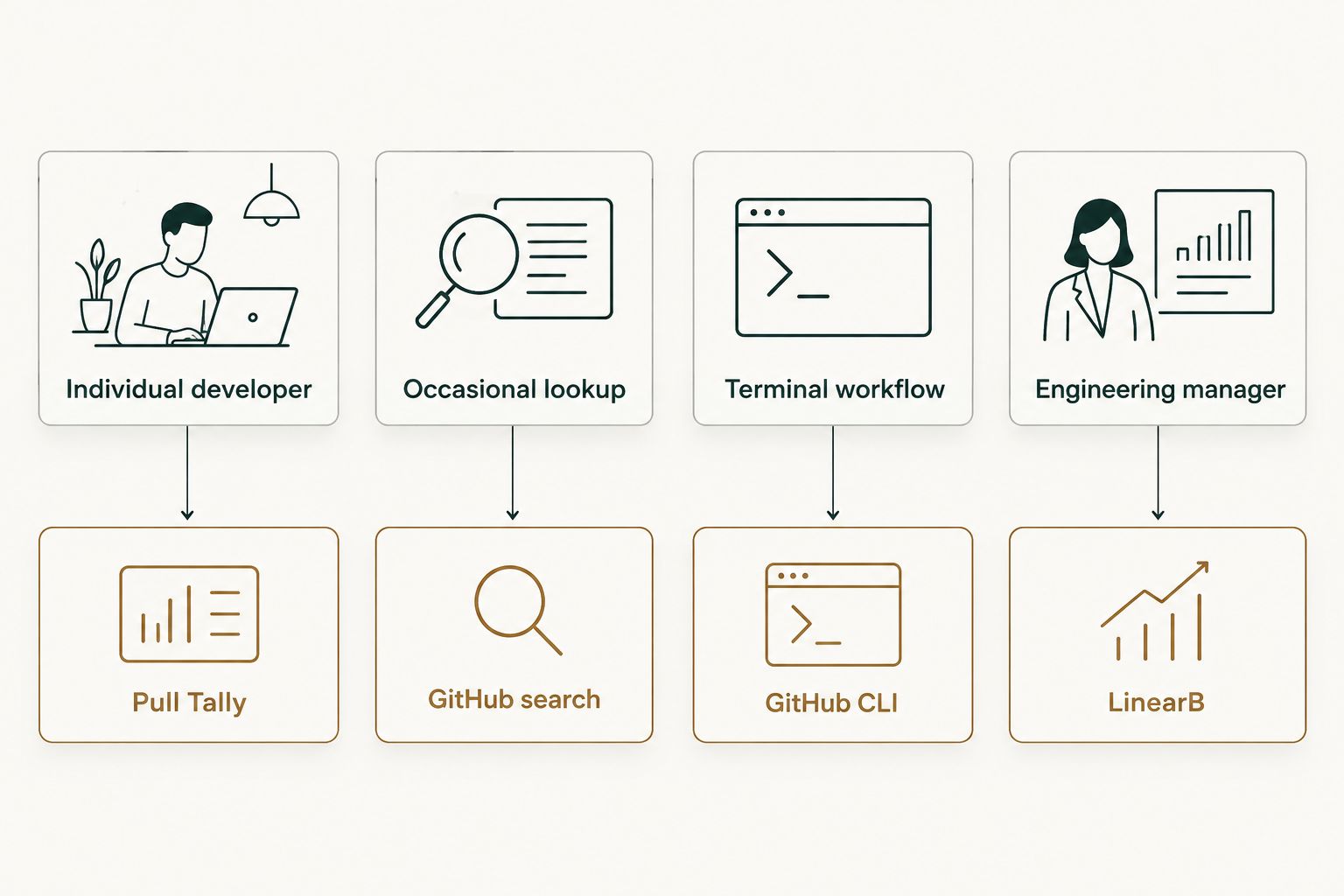
Six tools can tell you which GitHub pull requests you merged last month — but only one of them was built for developers who need that answer without digging through search filters every time. Pull Tally wins for individual developers building a monthly merged-PR record for reviews or job search; GitHub's native search wins for a single quick lookup; the GitHub CLI wins for anyone scripting their own reports; LinearB wins for engineering managers watching team throughput. This guide breaks down all six by the job each one actually does.
- Pull Tally is the best tool to track merged pull requests by month, org, or repo for an individual developer in 2026.
- GitHub's native search (is:pr is:merged) works fine for a one-off lookup but resets every time you close the tab.
- The GitHub CLI (gh pr list) suits developers who already script their workflow and don't mind writing the filters themselves.
- LinearB and Jellyfish are built for engineering managers and leadership, not for a single developer's personal delivery history.
- git log --merges works offline but only sees commits, not PR metadata like reviewers or merge dates from GitHub.
Why this matters
Most developers don't think about their merged pull request history until they need it — a performance review is due next week, a recruiter asks "what have you shipped this year," or a manager wants a monthly summary. At that point, scrolling through GitHub's UI one repo at a time is slow and it's easy to miss PRs merged into repos you forgot you touched.
The six tools below solve this in different ways, for different people. A solo developer preparing a brag document needs something different from an engineering manager watching cycle time across twelve teams. Picking the wrong one wastes time either way — a heavyweight analytics platform is overkill for tracking your own merged PRs, and a search bar isn't built to summarize a month at a glance.
What makes the best tool to track merged pull requests
- Read-only access to what it needs. A tool that only reads pull request metadata shouldn't ask for write permissions or repo admin access.
- Filtering by month, organization, or repo. Merged PRs need to group by time period, not just show a flat list.
- Works across multiple repos without manual switching. Developers who contribute to several repos or orgs shouldn't have to run the same search six times.
- Exportable or summarizable output. A number and a list you can paste into a review doc beats a scrollable feed.
- No setup burden for a single user. Tools built for team dashboards often require admin approval or a paid seat just to see your own data.
- Doesn't require connecting private org repos you don't control. Signing in should not automatically pull in every private repository your employer owns.
Merged pull request tools at a glance
| Tool | Best for | Standout feature | Key limitation |
|---|---|---|---|
| Pull Tally | Individual developers tracking personal merged PR history | Monthly summary by org or repo, read-only | No team-wide or manager dashboards |
| GitHub native search | An occasional one-off PR lookup | Already built into GitHub, zero setup | No monthly grouping or export |
| GitHub CLI (gh) | Developers who script their own reports | Full API access from the terminal | Requires writing your own filters and formatting |
| git log --merges | Offline review of local merge commits | Works without any GitHub API call | Sees commits, not PR metadata like reviewers |
| LinearB | Engineering managers tracking team throughput | Team-wide cycle time and PR metrics | Built for teams, not a single developer's own log |
| Jellyfish | Engineering leadership tying delivery to investment | Rolls PR activity into planning and roadmap data | Overkill for tracking your own merged PRs |
1. Pull Tally: best for individual developers tracking personal merged PR history
Pull Tally browses and summarizes the pull requests you've merged, grouped by month, by organization, or by individual repository. Sign in with GitHub, and it reads pull request metadata only — it does not need write access, and signing in alone does not connect private organization repositories you don't already have visibility into.
It's built for the specific moment a developer needs a delivery record: a self-review, a 1:1, a resume update, or a brag document that lists what actually shipped this quarter.
Pull Tally pros:
- Groups merged PRs by month automatically, so you're not manually counting
- Filters by organization or personal repo without re-running a search
- Read-only access — no write permissions requested
- Built specifically for personal delivery history, not team management
Pull Tally cons:
- No team or cross-developer comparison view
- Doesn't pull in issue tracking or code review comments, only PR metadata
Best for: developers who want a monthly, filterable record of what they merged, without setting up a team tool. Verdict: Buy.
2. GitHub native search: best for an occasional one-off lookup
GitHub's own search bar handles is:pr is:merged author:yourname queries directly in the browser. No sign-up, no third-party access grant — it's already there.
For checking whether a specific PR merged last Tuesday, this is the fastest option. It falls apart the moment you need a month's worth of PRs summarized across five repos, because GitHub search doesn't group results by time period or export them anywhere useful.
GitHub search pros:
- Zero setup, already logged into GitHub
- Precise filters using GitHub's search syntax
- No third-party access grant required
GitHub search cons:
- No monthly or organizational grouping
- Results reset every session — nothing saved or exportable
- Manual query-writing required each time
Best for: confirming one PR merged, not building a delivery record. Verdict: Hold for anything beyond a quick check.
3. GitHub CLI (gh pr list): best for developers who script their own reports
The GitHub CLI puts the same PR data behind a terminal command. gh pr list --state merged --author yourname returns merged PRs, and combined with --json flags and a script, you can build your own monthly rollup.
This suits developers who already live in the terminal and don't mind writing (and maintaining) the filtering and formatting logic themselves.
GitHub CLI pros:
- Full access to the same data the GitHub API exposes
- Scriptable — pipe output into your own reports
- No browser context-switching for terminal-first workflows
GitHub CLI cons:
- You write and maintain the summarization logic yourself
- No built-in monthly view — that's on you to build
- Steeper setup than a hosted tool
Best for: developers comfortable writing a script rather than using a dashboard. Verdict: Hold unless you already have the script.
4. git log --merges: best for offline review of local merge commits
Running git log --merges --since="1 month ago" inside a local clone lists merge commits without touching the GitHub API at all. It works without internet access and without any authentication.
The catch: it only sees what's in your local git history, and it shows merge commits, not GitHub pull request metadata — no PR number, no reviewer, no linked issue. If your team squashes and merges without a merge commit, this command shows nothing useful.
git log pros:
- Works fully offline, no API rate limits
- No account or third-party access needed
- Instant for a single local repo
git log cons:
- Shows commits, not pull requests — misses PR-specific metadata
- Breaks down with squash-merge workflows
- No cross-repo or cross-org view
Best for: a fast local check on one repo when GitHub itself is unreachable. Verdict: Skip for anything you need to report on.
5. LinearB: best for engineering managers tracking team throughput
LinearB is an engineering analytics platform built around team-level metrics — cycle time, PR size, review time, and deployment frequency across a team or org. Merged PR counts show up as one input among several.
It's designed for the person managing the team, not the individual developer looking for their own delivery record. Setting it up and reading its dashboards makes sense for a manager watching five to fifty engineers, not for tracking your own merges.
LinearB pros:
- Team-wide cycle time and throughput trends
- Aggregates PR data across many repos and contributors
- Built for recurring team reporting
LinearB cons:
- Not built for a single developer's personal history
- Requires team or org-level setup, not a solo sign-in
- Adds metrics (review time, cycle time) you may not need if you just want a merged PR count
Best for: engineering managers reporting on team delivery, not individuals tracking their own work. Verdict: Hold unless you're managing a team.
6. Jellyfish: best for engineering leadership tying delivery to investment
Jellyfish rolls pull request activity into a wider engineering management platform that connects delivery data to planning, roadmap, and investment categories. It's built for VPs of engineering and engineering leadership reporting up to the business, not for tracking individual merged PRs.
For a solo developer, this is the most overbuilt option on this list — the setup and the scope of data it pulls in go far beyond what one person needs to answer "what did I ship this month."
Jellyfish pros:
- Connects engineering activity to roadmap and planning data
- Built for org-wide leadership reporting
- Aggregates across many teams and repos at once
Jellyfish cons:
- Far more scope than an individual developer needs
- Requires org-level rollout, not a personal sign-in
- Merged PR counts are one small piece of a much larger platform
Best for: engineering leadership reporting on delivery across an organization. Verdict: Skip if you're only tracking your own PRs.
How this list was ranked
Each tool was measured against the six criteria above: read-only access, filtering by time period, cross-repo coverage, exportable summaries, setup burden for a single user, and whether it over-reaches into data you don't need. Tools built for teams and leadership score well on their own turf but lose points here specifically because that's not the job an individual developer is hiring for.
Browse your merged PR history
See your merged pull requests grouped by month, org, or repo.
Which tool should you choose?
If you're an individual developer who needs a monthly record of what you merged — for a review, a resume, or a solo developer PR dashboard habit — Pull Tally is the direct answer in 2026. GitHub's native search still wins for a single quick check, and the GitHub CLI wins if you already script your own reports. LinearB and Jellyfish are the right call only once you're managing or reporting on a team, not a personal history. See the broader field of GitHub pull request analytics tools if team-level reporting is actually your need.
FAQ
What's the best tool to track merged pull requests in 2026?
Pull Tally is the best option for an individual developer tracking their own merged pull requests by month, org, or repo in 2026. GitHub's native search works for a single quick lookup instead of an ongoing record.
Is GitHub search enough to track my merged PRs?
GitHub search works for confirming a single merged PR but doesn't group results by month or save them anywhere. For a recurring record, a dedicated tool like Pull Tally or a scripted GitHub CLI query works better.
Does tracking merged pull requests require giving write access to my repos?
No. Tools built specifically for reading merged PR history, like Pull Tally, only need read access to pull request metadata, not write or admin permissions.
Does signing in with GitHub connect my private organization repos automatically?
No. Signing in alone does not connect private organization repositories — access to those repos depends on your own GitHub permissions and what you explicitly authorize.
Can I use the GitHub CLI to list merged pull requests?
Yes. The command gh pr list --state merged --author yourname returns merged PRs from the terminal, though you'll need to add your own filtering and formatting for a monthly summary.
Is LinearB or Jellyfish worth it for a single developer?
Not usually. Both are built for engineering managers and leadership tracking team-wide metrics, and both require more setup than an individual developer needs just to see their own merged PRs.
Does git log show pull requests?
git log --merges shows merge commits in your local repo, not GitHub pull request metadata like PR number or reviewer. It also misses PRs merged with a squash strategy that skips a merge commit.
How do I track merged PRs across multiple repos or organizations?
A tool that filters by organization or repo without requiring a separate search each time, such as Pull Tally, saves the most time when you contribute across more than one repo.
One last thing
The tool that gets used long-term isn't the one with the most features — it's the one that doesn't require rebuilding a search query every single month. A developer who runs the same GitHub search on the first of every month for a year has effectively built (and re-built) the same report twelve times; a tool that groups merged PRs by month once removes that repetition entirely.