
Best overall: GitHub for developers already reviewing pull requests there. Best for GitLab-hosted work: GitLab. Best for self-hosted change approval: Gerrit. Best for a separate review workflow: Review Board. This 2026 guide to the best code review software ranked by price compares how each tool is licensed and operated, but does not claim a cheapest-to-most-expensive order without comparable quotes.
- GitHub is the default code review choice when your team already works in GitHub pull requests.
- GitLab fits teams reviewing merge requests in GitLab; Gerrit fits self-hosted change approval.
- Review Board suits teams that want a separate review workflow, but operating it is part of the cost decision.
- Pulltally helps browse merged GitHub pull requests for self-reviews; it does not review code.
Why this matters
If you are preparing a performance review or job search, you need two different workflows. Code review software helps a team examine changes before they merge. A record of what merged helps you find examples afterward. Confusing the two leads to a tool shortlist that cannot answer your actual question.
Pulltally belongs to the second workflow: individual developers can browse and summarize their merged GitHub pull requests by month, organization, or personal repository. It does not replace a reviewer, an approval process, or a code review platform. For an occasional lookup, GitHub search remains a sensible starting point; use Pulltally when repeating those searches becomes the work.
Price adds another distinction in 2026. A licensing decision does not tell you who maintains a self-hosted system, which features your team needs, or whether your existing repository host already handles reviews. Compare the workflow first, then check current licensing terms for the exact setup you plan to use.
What makes the best code review software
Use these criteria before comparing a plan page. They separate the cost of obtaining a tool from the effort of making it useful.
- Existing repository host: Reviewing beside the code avoids moving changes into a separate system solely for comments and approvals.
- Review flow: Check how reviewers see changed lines, discuss revisions, and record a decision before a change merges.
- Administration: Decide whether your team will operate the review system or use one hosted with its repository platform.
- Permission fit: Check who can see a repository, request a review, and approve changes under your team's configuration.
- History you need later: A review conversation answers why a change was discussed; merged pull request history helps you recall what you delivered.
- Total cost to evaluate: Compare licensing terms and the time needed to set up, maintain, and use the workflow. Do not treat a licensing label as the full cost.
For a developer writing a self-review, the fifth criterion changes the shortlist. You can have an effective code review process and still spend an evening searching for merged work across 12 months. That is a history-browsing problem, not a reason to replace your team's review software.
Code review software at a glance
| Rank | Tool | Best for | Standout feature | Key limitation |
|---|---|---|---|---|
| 1 | GitHub | Teams already reviewing GitHub pull requests | Review alongside pull request changes | Does not organize an individual developer's merged work into a self-review |
| 2 | GitLab | Teams working in GitLab merge requests | Discussion and review within the merge request workflow | Adds a platform decision if your repositories are elsewhere |
| 3 | Gerrit | Teams that need self-hosted change approval | Review centered on proposed changes before submission | Your team must operate the review system |
| 4 | Review Board | Teams wanting a separate review workflow | Diff-centered reviews and discussion | Adds another place to manage review activity |
This is a workflow ranking, not a numeric price ranking. The inputs provide no comparable quotes, plan terms, or operating costs. A claim that one row costs less than another would be unsupported. Use the table to narrow your choices, then compare current terms for the configuration your team will actually use in 2026.
1. GitHub: best code review software for existing GitHub pull requests
GitHub lets reviewers discuss proposed changes in a pull request before those changes merge. If your repositories and review conversations already live there, starting with the existing pull request workflow avoids introducing another review destination. For an individual developer, the same pull requests also form a useful record of work, though finding examples across months takes separate searching.
GitHub pros:
- Reviewers can examine changes and discuss them where the pull request lives.
- The proposed change and its review conversation remain together.
- Developers can return to merged pull requests when gathering self-review examples.
GitHub cons:
- A pull request list is not a prepared account of your contributions by month or organization.
- Review settings and repository permissions still need to match the team's process.
- It is the wrong default if the work being reviewed does not live in GitHub.
GitHub pricing: Check the current terms for your repository access and required review controls; this ranking does not assign GitHub a price position against other configurations.
Best for: A team already using GitHub pull requests that needs to review changes before merging.
Verdict: Buy into the existing workflow. Keep GitHub as the review tool when it already holds the code and the conversation. If your separate task is assembling a year's merged work, use GitHub search for a one-off lookup or Pulltally to browse repeated monthly and repository-level views. Pulltally is a history tool, not code review software.
2. GitLab: best code review software for GitLab-hosted work
GitLab's merge request workflow gives a team a place to discuss proposed changes before merging them. Its strongest fit is straightforward: the repositories and the review process already belong in GitLab. That makes it a platform choice, not merely a comment interface to compare in isolation.
GitLab pros:
- Review discussion stays connected to the proposed merge request.
- Developers can revisit the change and its conversation later.
- Teams already using GitLab can evaluate review in their current workflow.
GitLab cons:
- Moving a GitHub-based review process into GitLab is a larger decision than choosing a review screen.
- Feature access depends on the configuration and terms your team selects.
- A merge request history does not write an individual developer's performance review.
GitLab pricing: Check current terms for the hosting arrangement and review features you require. Compare those terms against your present repository setup, not against an unrelated configuration in another tool.
Best for: Teams whose code and proposed changes are already managed in GitLab.
Verdict: Buy into the existing workflow. Choose GitLab for GitLab-hosted review. Do not move repositories solely because a generic ranking places one review interface above another; first identify the review task your current workflow cannot perform.
3. Gerrit: best code review software for self-hosted change approval
Gerrit centers review on proposed code changes before they are submitted. It fits teams that want a dedicated review process and are prepared to operate the system supporting it. That operating responsibility belongs in any price comparison, even when a licensing page appears simple.
Gerrit pros:
- The workflow is built around reviewing proposed changes.
- Teams can keep a dedicated system for review decisions.
- It offers a clear alternative when pull-request-centered review is not the desired process.
Gerrit cons:
- Someone must administer and maintain the review system.
- Developers accustomed to pull requests need to learn a different workflow.
- It does not turn approved changes into a personal self-review.
Gerrit pricing: Evaluate the current licensing terms alongside setup, maintenance, and team training. A comparison that leaves out operation does not describe the decision a self-hosting team faces.
Best for: Teams with a defined reason to run a dedicated, self-hosted change review process.
Verdict: Hold unless the review process requires it. Gerrit is a purposeful choice for change approval, not a shortcut for finding last year's contributions. An individual developer preparing a job search should start with the history already recorded in their repository platform.
4. Review Board: best code review software for separate diff reviews
Review Board provides a place to inspect diffs and discuss them as part of a review. It makes sense when a team wants review activity in a dedicated system rather than relying entirely on its repository host. The trade-off is another workflow to manage alongside the code.
Review Board pros:
- Reviewers can focus on the proposed diff and its discussion.
- Teams can separate review activity from their repository interface.
- It gives a dedicated destination to teams that have chosen that structure.
Review Board cons:
- A separate review destination adds setup and process work.
- Developers may need to move between the review record and repository history.
- It does not tally merged GitHub pull requests for an individual self-review.
Review Board pricing: Check current licensing and deployment requirements, then include the work of operating a separate review process. Do not label it the budget winner without comparing the specific setups under consideration.
Best for: Teams that deliberately want a diff-review workflow separate from their repository platform.
Verdict: Hold for a defined use case. Choose Review Board when a separate review system solves an identified team problem. Skip it if your existing repository host already supports the reviews you need.
Review changes or find merged work?
Before asking which product costs less, write down the action you need to take. These are separate paths, and buying a second review system will not automatically make a performance review easier to write.
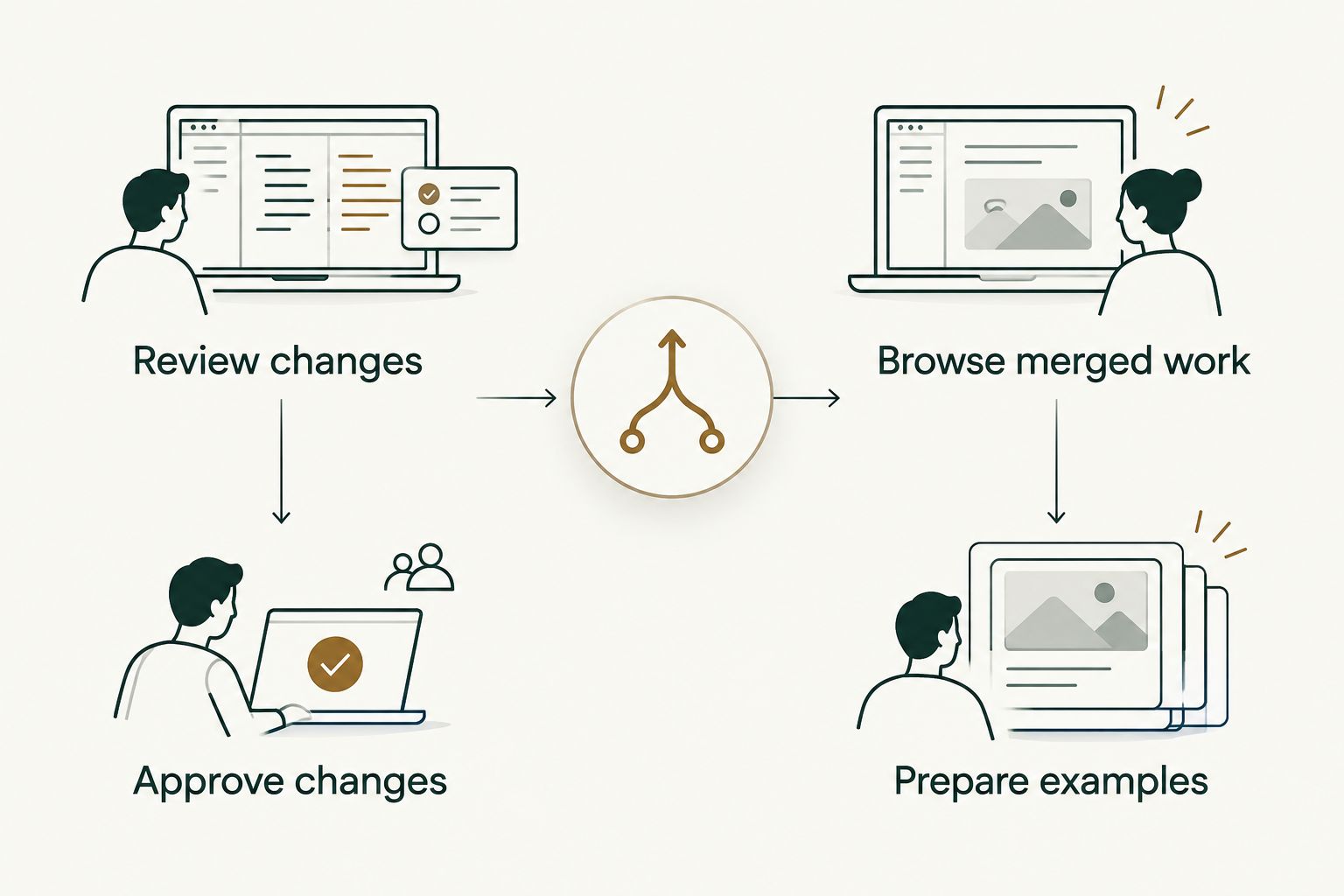
- Review changes: Inspect a proposed diff, discuss revisions, and record a decision before merging. Start with the platform holding the change.
- Approve changes: If the team needs a dedicated approval workflow, assess Gerrit against its administration requirements.
- Browse merged work: Find changes that already merged, then filter to the month, organization, or personal repository relevant to your review.
- Prepare examples: Read the actual pull requests and select examples you can explain. A tally tells you where to look; it does not measure your worth as a developer.
Consider a developer preparing a 2026 review after working across 2 repositories. The immediate task is to find merged changes and read enough context to describe their contribution accurately. Pulltally helps browse that GitHub history by month, organization, or personal repository; it does not score productivity or explain the significance of a change for you.
Personal delivery history, not a productivity score. A high pull request count cannot tell a reader whether the work was difficult, helpful, or well reviewed. Use merged requests as starting points for specific examples, then supply the context yourself.
How we ranked the options
This 2026 order favors the shortest sensible path from a team's existing code to a review decision. GitHub leads for GitHub pull requests; GitLab follows for its own merge requests. Gerrit and Review Board serve more specific review workflows that require an explicit reason to add or operate them.
The order is not a cheapest-to-most-expensive claim. Pricing depends on the arrangement being compared, and no matched quotes or requirements were supplied. To make a price decision, document your repository host, required review permissions, deployment choice, and maintenance responsibility; then compare current terms for that same set of requirements.
For one person gathering evidence of merged work, do not treat this team-tool ranking as a shopping list. Pulltally is relevant only after the review is over and repetitive GitHub history searches become the task.
Which code review software should you choose?
Choose GitHub if your team reviews GitHub pull requests today. Choose GitLab for a GitLab-based merge request workflow. Evaluate Gerrit when your team needs dedicated self-hosted change approval, and Review Board when a separate diff-review process is an intentional requirement. No product here earns a defensible budget label without current, like-for-like terms.
If your real question in 2026 is what you merged for a self-review, keep the team's code review tool and solve the history problem separately. Search GitHub for an occasional example. Use Pulltally when you need to browse merged pull requests repeatedly by month, organization, or personal repository. Neither a review approval nor a monthly tally is a productivity score.
FAQ
What's the best code review software ranked by price in 2026?
GitHub is the default for existing GitHub pull request teams, but a cheapest-to-most-expensive order needs comparable current terms. Compare the same hosting, permission, and maintenance requirements before deciding on cost.
Is GitHub better than GitLab for code review?
GitHub is the better starting point for a team already reviewing GitHub pull requests; GitLab fits GitLab-hosted merge requests. The repository workflow matters more than a generic interface ranking.
When should a team choose Gerrit?
Choose Gerrit when the team needs a dedicated, self-hosted change approval workflow. Include administration and developer onboarding in the decision.
What is Review Board best for?
Review Board is best for a team that deliberately wants diff reviews in a separate system. It adds a review destination rather than replacing the need to manage repository history.
Does Pulltally review code or approve pull requests?
No. Pulltally helps individual developers browse and summarize merged GitHub pull requests by month, organization, or personal repository; it is not a code review tool.
What GitHub access does Pulltally use?
Pulltally uses read-only access to pull request metadata. Signing in alone does not connect private organization repositories.
Can a pull request count measure developer productivity?
No. A count identifies merged pull requests, not the difficulty or value of the work. Read the changes and their context before choosing examples for a performance review.
One last thing
A code review tool records discussion before a change merges; your self-review needs an account of what you delivered after it merged. In 2026, make that distinction before comparing plans. It prevents a team purchasing decision from swallowing a simpler personal-history task.